


Membership Card Issuing Kiosk Solution
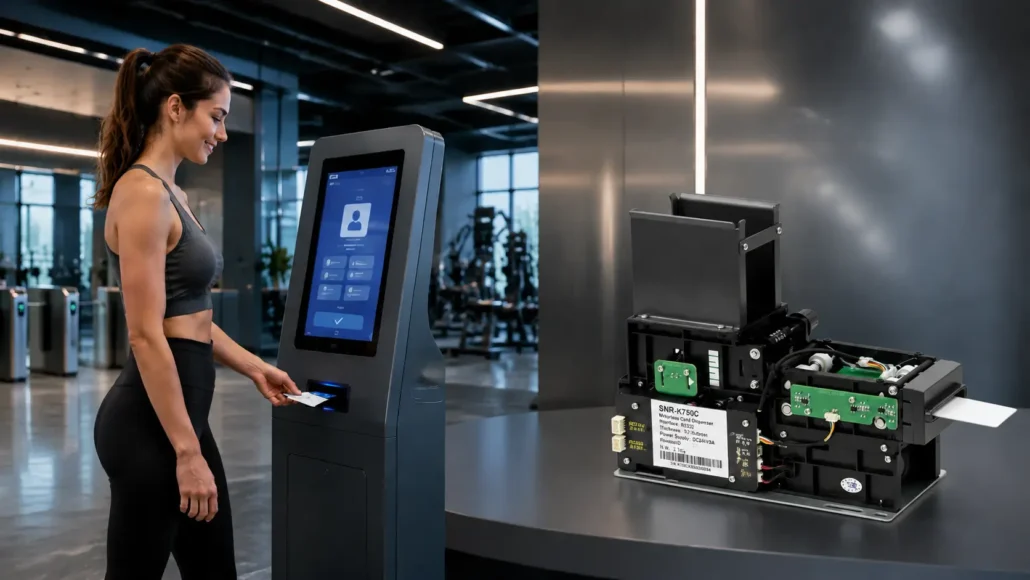
Membership Card Issuing Kiosk Solution for RFID & Magnetic Stripe Loyalty Card Delivery
Membership programs have become an important customer engagement tool across retail, fitness, hospitality, entertainment and access control industries.
However, when companies move from a traditional membership registration process to a self-service environment, one challenge becomes increasingly important:
How can customers register, receive and activate their membership cards without manual assistance?
A successful membership card issuing kiosk is not only a touchscreen terminal with a card dispenser.
It is a complete hardware and software system that connects:
- Membership management platform
- Kiosk application software
- Card personalization technology
- Card issuing mechanism
- Customer interaction workflow
Different industries also use different card technologies.
Some new loyalty and membership systems use RFID cards because they provide contactless identification and higher flexibility.
However, many existing membership programs, fitness clubs, casinos, retail loyalty systems and legacy customer platforms still rely on magnetic stripe cards.
For this reason, a professional membership card issuing kiosk solution should support different card technologies based on the actual project requirements.
SNRO provides complete membership card issuing hardware solutions covering:
- RFID card issuing systems
- Magnetic stripe card issuing systems
- Reusable RFID card recycling systems
- Industrial kiosk controller solutions
Our hardware is designed for:
- Kiosk manufacturers
- System integrators
- Loyalty solution providers
- Retail automation companies
- Hospitality technology companies
- Access control solution providers
From prototype testing to production deployment, SNRO helps partners build reliable automated membership card issuing terminals.
Why Businesses Need Automated Membership Card Issuing Solutions
Traditional membership card issuance usually depends on staff assistance.
For example:
A customer joins a fitness club.
A staff member creates the account.
The card is programmed manually.
The customer waits for the card.
This process works, but it creates operational limitations when businesses expand.
Common challenges include:
- Long registration queues
- Increased front desk workload
- Limited service hours
- Higher labor costs
- Inconsistent card issuing processes
- Difficulty supporting multiple locations
An automated membership registration kiosk changes this workflow.
Customers can complete registration independently and receive their membership card immediately.
For businesses operating high-volume membership programs, self-service card issuing provides:
- Faster customer onboarding
- Reduced staff workload
- 24/7 registration capability
- Consistent card delivery process
- Scalable deployment across multiple locations
What Is a Membership Card Issuing Kiosk?
A membership card issuing kiosk is an automated self-service terminal that allows users to register, verify information, personalize and receive membership credentials.
A complete system normally includes:
- Touchscreen display
- Industrial computer
- Membership application software
- RFID reader/writer or magnetic stripe encoder
- Motorized card dispenser
- Optional printer
- Barcode or QR scanner
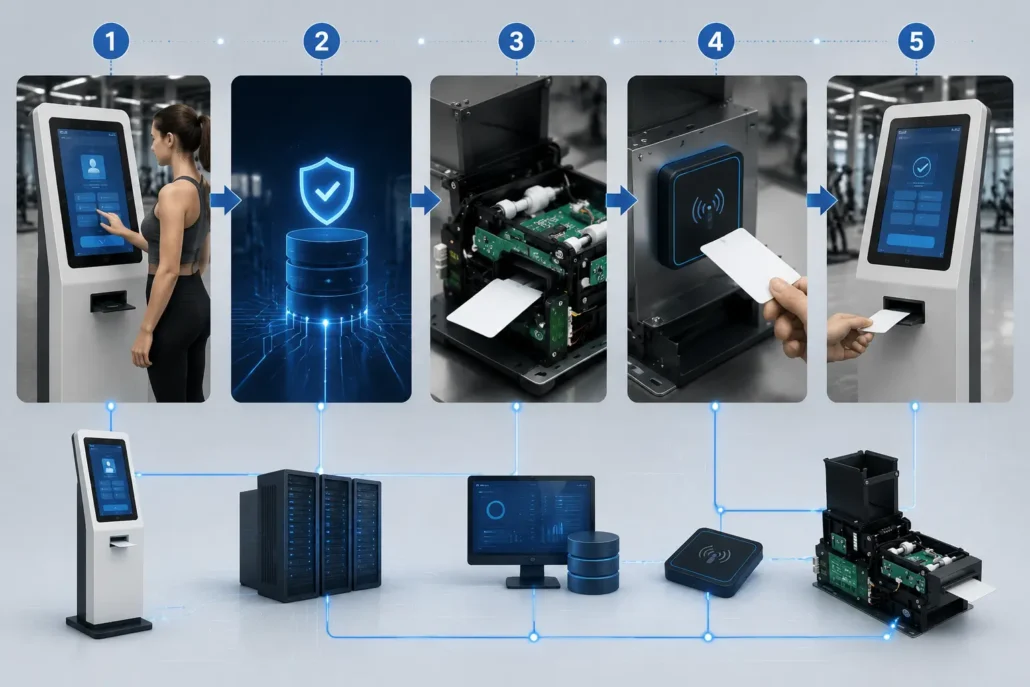
The kiosk performs the complete issuing workflow:
Customer Registration
↓
Membership Verification
↓
Card Personalization
↓
Card Validation
↓
Automatic Card Delivery
↓
Membership Activation
The key difference between a simple card dispenser and a complete membership card issuing kiosk is system integration.
The dispenser only handles physical card movement.
The complete solution connects business software, card technology and hardware automation together.
RFID vs Magnetic Stripe Membership Card Systems
Membership card projects do not always use the same card technology.
The correct solution depends on:
- Existing membership platform
- Customer database
- Security requirements
- Card replacement strategy
- Deployment environment
RFID Membership Card System
RFID cards are commonly used in modern membership and loyalty systems.
Advantages include:
- Contactless operation
- Faster user interaction
- Flexible credential management
- Support for access control integration
Typical applications:
- Modern retail loyalty systems
- Fitness clubs
- Hospitality membership programs
- Smart access systems
Recommended SNRO hardware:
- SNR-K750C RFID Card Dispenser
- SNR-K750L RFID Card Recycler
Magnetic Stripe Membership Card System
Magnetic stripe cards remain widely used in many existing membership environments.
Advantages include:
- Compatibility with legacy systems
- Existing customer database support
- Lower card cost
- Easy replacement of traditional membership cards
Typical applications:
- Fitness club membership cards
- Casino loyalty cards
- Retail membership programs
- Existing POS loyalty systems
Recommended SNRO hardware:
Automated Membership Card Issuing Workflow
A typical deployment follows several stages.
Customer Registration
The customer interacts with the kiosk touchscreen.
The system collects required information, such as:
- Customer profile
- Membership plan
- Payment information
- Account details
Membership System Verification
The kiosk communicates with the backend membership platform.
The system verifies:
- Customer identity
- Membership status
- Registration information
Card Personalization
Based on the selected card technology:
RFID Card
The RFID module writes required information into the card.
Magnetic Stripe Card
The magnetic stripe encoder writes membership data onto the magnetic stripe.
Card Verification
Before issuing the card, the system verifies:
- Card encoding result
- Card readability
- Data accuracy
This step helps reduce failed transactions during unattended operation.
Automated Card Delivery
After successful verification, the motorized card dispenser separates and delivers the card to the customer.
For reusable card projects, the system can also collect and recycle returned cards.
Membership Activation
The backend system updates the customer account and completes the membership activation process.
Why System Integrators Should Consider Hardware Architecture Early
Many kiosk projects focus heavily on software during the initial stage.
However, hardware decisions made later can create redesign risks.
For membership card issuing kiosks, early evaluation should include:
- Card technology selection
- Dispenser type
- Encoder compatibility
- Communication protocol
- Kiosk mechanical design
- Maintenance accessibility
Selecting the correct hardware architecture before prototype development helps avoid:
- Cabinet redesign
- Software modification
- Hardware replacement
- Deployment delays
Complete Membership Card Issuing Kiosk Architecture
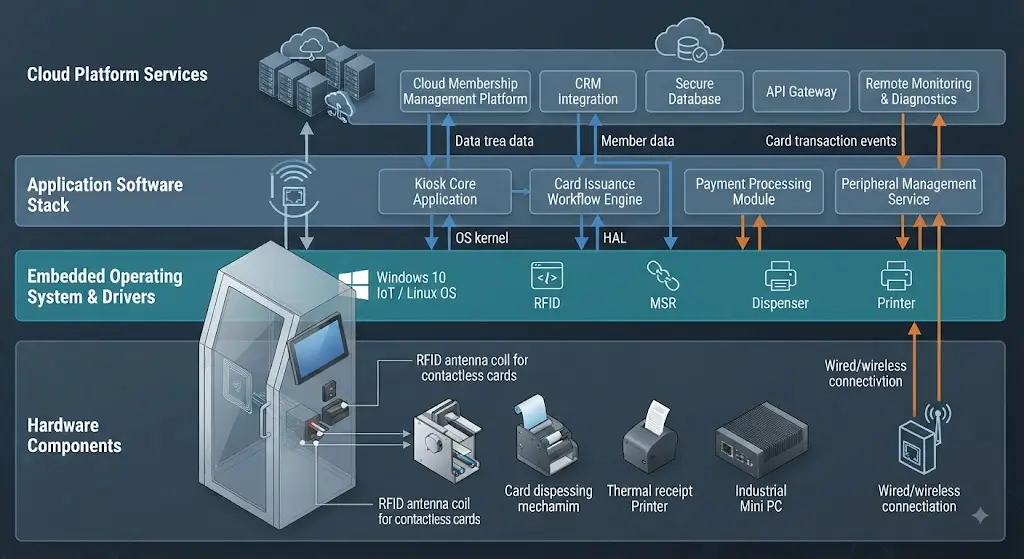
A membership card issuing kiosk should be designed as an integrated system rather than as a collection of independent hardware modules.
The business platform controls customer and membership information. The kiosk application manages the user workflow and communicates with the hardware. The card personalization layer prepares the membership credential, while the card dispenser handles physical card delivery.
A typical architecture can be structured as follows:
Membership / Loyalty Platform
        ↓
Kiosk Application Software
        ↓
Industrial PC Controller
        ↓
Card Personalization Layer
        ↓
 ┌──────────────────────────────┐
 │                              │
 │ RFID Reader / Writer         │
 │ Magnetic Stripe Encoder      │
 │                              │
 └──────────────────────────────┘
        ↓
Card Issuing / Recycling Layer
        ↓
 ┌──────────────────────────────┐
 │ SNR-K750C                    │
 │ SNR-CD212-M8                 │
 │ SNR-K750L                    │
 └──────────────────────────────┘
        ↓
Customer Receives Membership Card
The actual hardware combination depends on the card technology and membership workflow.
Not every project needs every module.
For example, an RFID membership kiosk may use an RFID reader/writer together with an RFID-compatible card dispenser, while a legacy magnetic stripe membership system may use a magnetic stripe card dispenser instead.
Membership Kiosk Hardware System Layers
Business Platform Layer
The membership or loyalty platform manages the business information behind the kiosk.
Typical functions include:
- Customer registration
- Membership plans
- Account management
- Loyalty programs
- Membership status
- Card assignment
- Customer records
The kiosk should communicate with this platform through the project’s existing API, database or application architecture.
Kiosk Application Layer
The kiosk application provides the customer-facing workflow.
It may control:
- Registration
- Membership selection
- Payment
- Customer verification
- Card personalization
- Card issuing
- Error handling
- Membership activation
The application also needs to communicate with the connected hardware.
For an unattended kiosk, this layer should be able to identify hardware exceptions and provide an appropriate recovery workflow.
Industrial Controller Layer
The industrial PC acts as the central controller between the kiosk application and hardware modules.
A typical controller may communicate with:
- RFID reader/writer
- Magnetic stripe card dispenser
- RFID card dispenser
- Card recycler
- Kiosk printer
- Barcode scanner
- Payment peripherals
For continuous self-service operation, the controller should be selected based on the complete hardware configuration rather than CPU performance alone.
Important considerations include:
- Operating system
- Available USB ports
- Serial interfaces
- Network connectivity
- Mounting method
- Continuous operation requirements
- Available space inside the kiosk
Card Personalization Layer
The card personalization layer is responsible for preparing the membership credential before delivery.
The technology depends on the card used by the project.
RFID Card Personalization
For RFID membership cards, the system may need to:
- Detect the card
- Read existing information
- Write membership data
- Verify the written information
- Associate the card with the customer’s account
- Release the card
The exact commands and data structure depend on the RFID card technology and the membership platform.
Magnetic Stripe Card Personalization
For magnetic stripe membership cards, the system needs to:
- Load the card
- Write the required magnetic stripe data
- Verify the writing result
- Associate the card with the membership account
- Deliver the card
For projects using an existing membership platform, compatibility with the existing magnetic stripe data format should be confirmed during prototype testing.
Card Issuing and Recycling Layer
The physical card handling mechanism is responsible for storing, separating and delivering membership cards.
The correct hardware depends on the project workflow.
Standard Card Issuing
Used when the customer receives the card permanently.
Typical hardware direction:
SNR-K750C for RFID cards
SNR-CD212-M8 for magnetic stripe cards
Card Recycling
Used when cards are temporary or intended for repeated use.
Typical hardware direction:
SNR-K750L RFID Card Recycler
The recycling workflow requires additional software logic because the system must determine whether a returned card is valid before making it available for another customer.
Card Technology Selection Guide
The card technology should be selected before finalizing the kiosk hardware architecture.
| Card Technology | Recommended SNRO Hardware | Typical Application |
|---|---|---|
| 13.56MHz RFID membership card | SNR-K750C | Modern membership and loyalty systems |
| Reusable RFID card | SNR-K750L | Temporary or shared credentials |
| Magnetic stripe membership card | SNR-CD212-M8 | Fitness, casino, retail and legacy loyalty systems |
| RFID + reusable workflow | SNR-K750L + RFID module | Reusable membership or access cards |
| Magnetic stripe legacy system | SNR-CD212-M8 | Existing membership infrastructure |
The final selection should always be confirmed against the actual card and existing system.
How to Choose the Right Card Issuing Hardware
The following questions should be answered before selecting the dispenser.
What Type of Card Is Being Used?
First identify whether the project uses:
- RFID cards
- Magnetic stripe cards
- Other card technologies
Do not select the dispenser only by appearance or card capacity.
Are Cards Permanent or Reusable?
This determines whether a standard dispenser or recycling solution is more appropriate.
Permanent Card
The customer keeps the card.
Recommended direction:
SNR-K750C or SNR-CD212-M8, depending on card technology.
Reusable Card
The customer eventually returns the card.
Recommended direction:
SNR-K750L for suitable RFID recycling applications.
How Many Cards Are Issued Per Day?
Daily transaction volume affects:
- Card storage requirements
- Loading frequency
- Maintenance workload
- Expected operating cycle
A kiosk issuing 20 cards per day has very different requirements from one issuing several hundred cards per day.
Does the Card Need to Be Personalized?
If the kiosk must encode customer-specific information before issuing the card, the project should evaluate the card personalization module and dispenser together.
This is especially important when RFID writing or magnetic stripe encoding is part of the workflow.
Typical Membership Kiosk Hardware Configuration
| Hardware Module | Recommended Direction | Main Function |
|---|---|---|
| Touch Display | 15.6″ / 21.5″ or project-specific | Customer interaction |
| Industrial PC | SNRO Industrial Mini PC | Application and hardware control |
| RFID Reader/Writer | Project-specific RFID module | RFID card personalization |
| RFID Card Dispenser | SNR-K750C | Permanent RFID card issuing |
| RFID Card Recycler | SNR-K750L | Reusable RFID card management |
| Magnetic Card Dispenser | SNR-CD212-M8 | Magnetic stripe card issuing |
| Kiosk Printer | 58mm / 80mm kiosk printer | Receipt or confirmation printing |
| QR / Barcode Scanner | Project-specific | Customer identification or registration |
| Network | Ethernet / Wi-Fi / project-specific | Backend communication |
Not every kiosk requires all of these modules.
The configuration should be built around the actual membership workflow.
Mechanical Integration Considerations
A dispenser may work correctly on a test bench and still create problems after being installed inside a kiosk.
The mechanical design should therefore be reviewed before the cabinet is finalized.
Important areas include:
- Dispenser mounting position
- Card outlet position
- Card collection height
- Internal cable routing
- Card loading access
- Service door position
- RFID module position
- Magnetic encoder installation
- Internal clearance
The card outlet should also be aligned with the customer interaction area.
If the card is difficult to see or collect, even a technically reliable dispenser can create a poor user experience.
Card Loading and Maintenance Access
Membership kiosks may operate for long periods without staff supervision.
Operators therefore need practical access to the card storage area.
Before finalizing the mechanical structure, check:
- How cards are loaded
- How often cards need to be replenished
- Whether the hopper can be removed easily
- Whether service personnel can access the dispenser
- Whether other modules need to be removed during maintenance
For multi-location deployments, these details become increasingly important because small maintenance tasks are repeated across many terminals.
Software and Hardware Integration
The hardware should be evaluated together with the kiosk application.
Typical integration points include:
- Device initialization
- Card detection
- Card dispensing
- Card collection
- RFID reading
- RFID writing
- Magnetic stripe encoding
- Device status
- Error reporting
- Transaction completion
The exact integration method depends on the selected hardware and project architecture.
Before mass production, the software team should test the complete transaction rather than testing each device independently.
Error Handling Should Be Designed Before Deployment
A membership kiosk should not assume that every card issuing transaction will succeed.
Possible exceptions include:
- Card dispensing failure
- Card not detected
- RFID writing failure
- Magnetic stripe writing failure
- Card not collected
- Communication interruption
- Backend timeout
- Power interruption
The kiosk application should define what happens after each type of failure.
For example:
Card Personalization
        ↓
Verification
        ↓
Successful?
   ↙          ↘
 YES           NO
 ↓             ↓
Dispense      Retry / Reject
 ↓             ↓
Confirm       Error Recovery
 ↓
Activate Membership
This type of workflow should be validated during prototype testing before production rollout.
Prototype Testing Checklist
Before moving from prototype to production, evaluate the complete system with the actual membership card.
Card Testing
- Actual production card
- Card thickness
- Card material
- RFID performance
- Magnetic stripe performance where applicable
- Card surface condition
Mechanical Testing
- Card loading
- Card dispensing
- Card collection
- Service access
- Outlet alignment
Software Testing
- Device initialization
- Card detection
- Card personalization
- Verification
- Error recovery
- Backend communication
Continuous Operation Testing
Do not rely only on a few successful transactions.
The prototype should be tested with repeated issuing cycles that represent realistic operating conditions.
This helps identify problems that may not appear during a short demonstration.
Membership Kiosk Design: What Should Be Confirmed Before Production?
Before freezing the kiosk design, the system integrator should ideally confirm:
| Item | What to Confirm |
|---|---|
| Card technology | RFID or magnetic stripe |
| Card dimensions | Actual card size |
| Card thickness | Production card specification |
| Card workflow | Permanent or reusable |
| Personalization | Required or not |
| Daily volume | Expected cards issued per day |
| Dispenser | Correct hardware configuration |
| RFID module | Card and command compatibility |
| Magnetic encoder | Existing system compatibility |
| Operating system | Windows / Linux / Android |
| Interface | USB / RS232 / other |
| Mechanical drawing | Mounting and outlet dimensions |
| Maintenance | Card loading and service access |
| Prototype | Real card and software testing |
| Production quantity | Initial and estimated annual volume |
This information gives the hardware supplier enough project context to recommend a practical configuration rather than simply quoting a standard product.
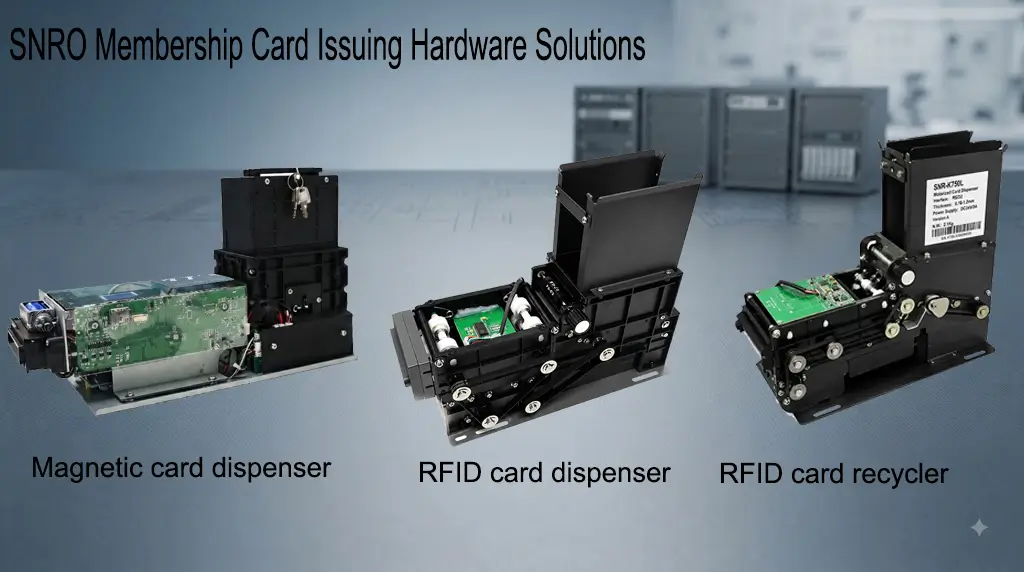
Recommended SNRO Membership Card Issuing Hardware Solutions
Different membership and loyalty projects have different requirements.
Some systems require permanent membership cards.
Some projects need compatibility with existing magnetic stripe infrastructure.
Some applications require reusable cards that can be collected and issued again.
For this reason, SNRO provides multiple card issuing hardware options covering:
- RFID membership card issuing
- Magnetic stripe membership card issuing
- RFID card recycling
- Kiosk control hardware integration
The final hardware selection should be based on:
- Card technology
- Membership platform requirements
- Card workflow
- Deployment environment
- Expected transaction volume
1. SNR-K750C RFID Card Dispenser
Best Choice for Modern RFID Membership Card Issuing Kiosks
SNR-K750C is designed for self-service kiosks that need automated RFID membership card delivery.
It supports integration with RFID reading and writing modules, allowing system integrators to build complete card personalization workflows before issuing the card to the customer.
The solution is suitable for modern membership systems where customers receive a permanent RFID credential.
Typical Applications of SNR-K750C RFID Card Dispenser
- Retail loyalty membership kiosks
- Fitness club membership terminals
- Hospitality membership systems
- Access credential issuing kiosks
- Customer identification terminals
- Smart membership registration machines
Key Advantages of SNR-K750C
RFID Card Compatibility
Designed for projects using contactless RFID membership cards.
The system can work together with RFID reader/writer modules to support:
- Card detection
- Data writing
- Card verification
- Automated issuing
Permanent Card Issuing Workflow
For membership programs where customers keep their cards after registration:
Customer Registration
↓
RFID Card Personalization
↓
Card Verification
↓
Automatic Card Dispensing
↓
Customer Receives Membership Card
Easy Kiosk Integration
System integrators can integrate SNR-K750C into:
- Floor-standing kiosks
- Countertop terminals
- Self-service registration machines
- Retail automation terminals
Recommended When
Choose SNR-K750C when:
- The project uses RFID membership cards
- Customers keep the issued card permanently
- Contactless identification is required
- The system may connect with access control or loyalty platforms
2. SNR-CD212-M8 Magnetic Stripe Card Dispenser
Best Choice for Magnetic Membership and Loyalty Card Systems
Although many new membership systems use RFID technology, magnetic stripe cards remain widely used in existing customer loyalty environments.
Many businesses already have:
- Existing membership databases
- Existing POS systems
- Existing magnetic card infrastructure
Replacing the complete system can be expensive.
SNR-CD212-M8 provides a practical solution for projects that need automated magnetic stripe membership card issuing.
Typical Applications
SNR-CD212-M8 is suitable for:
- Fitness club membership cards
- Casino loyalty cards
- Retail membership programs
- Existing customer loyalty systems
- Legacy membership platforms
- Magnetic card issuing kiosks
Key Advantages
Magnetic Stripe System Compatibility
The solution can support workflows requiring:
- Card feeding
- Magnetic stripe reading/writing
- Card verification
- Automated delivery
Supports Existing Membership Infrastructure
For companies with existing magnetic stripe systems, automated issuing allows them to upgrade customer experience without replacing the entire membership ecosystem.
This is especially valuable for:
- Large fitness chains
- Entertainment venues
- Existing retail loyalty programs
Automated Self-Service Card Delivery
A typical workflow:
Customer Registration
↓
Membership Database Verification
↓
Magnetic Stripe Encoding
↓
Card Validation
↓
Automatic Card Delivery
Recommended When
Choose SNR-CD212-M8 when:
- The customer already uses magnetic stripe cards
- Compatibility with existing systems is important
- A lower-cost membership card solution is required
- Legacy loyalty infrastructure must be maintained
3. SNR-K750L RFID Card Recycler
Best Choice for Reusable Membership and Credential Management
Some membership programs do not issue permanent cards.
Instead, cards are:
- Borrowed
- Returned
- Reused
For these applications, a standard dispenser is not enough.
SNR-K750L provides card dispensing, collecting and recycling capability.
Typical Applications
SNR-K750L can be evaluated for:
- Temporary membership cards
- Visitor credential systems
- Shared access cards
- Rental card programs
- Reusable loyalty cards
- Temporary employee credentials
Why Card Recycling Matters
For reusable card programs, recycling can reduce:
- Card consumption
- Operational cost
- Manual collection work
- Card management complexity
A typical recycling workflow:
Card Preparation
↓
Customer Receives Card
↓
Card Used During Service
↓
Card Returned
↓
Card Collected
↓
Card Stored For Next User
Recommended When
Choose SNR-K750L when:
- Cards need to be collected after use
- Card reuse is part of the business model
- The project wants to reduce consumable costs
- Temporary credentials are required
4. SNRO Industrial Mini PC for Membership Kiosk Integration
Hardware Controller for Complete Membership Kiosk Integration
The card dispenser is only one part of the kiosk system.
The industrial computer controls:
- Kiosk application
- Peripheral communication
- Network connection
- Backend integration
- Hardware status monitoring
SNRO industrial mini PCs provide a compact computing platform for self-service terminal integration.
Typical Functions
The industrial controller manages:
- Card dispenser communication
- RFID module communication
- Scanner integration
- Printer control
- Payment device connection
- Backend API communication
Recommended When
Choose an industrial mini PC solution when:
- The kiosk requires continuous operation
- Multiple hardware modules need integration
- Space inside the cabinet is limited
- Stable embedded computing is required
SNRO Membership Card Issuing Solution Comparison
| Solution | Card Technology | Workflow | Recommended Applications |
|---|---|---|---|
| SNR-K750C | RFID | Issue permanent membership cards | Modern loyalty, retail, fitness, hospitality |
| SNR-CD212-M8 | Magnetic Stripe | Issue magnetic membership cards | Legacy loyalty, casino, fitness, retail |
| SNR-K750L | RFID | Issue + collect + recycle | Temporary cards, reusable credentials |
| Industrial Mini PC | Control Platform | System integration controller | Complete kiosk deployment |
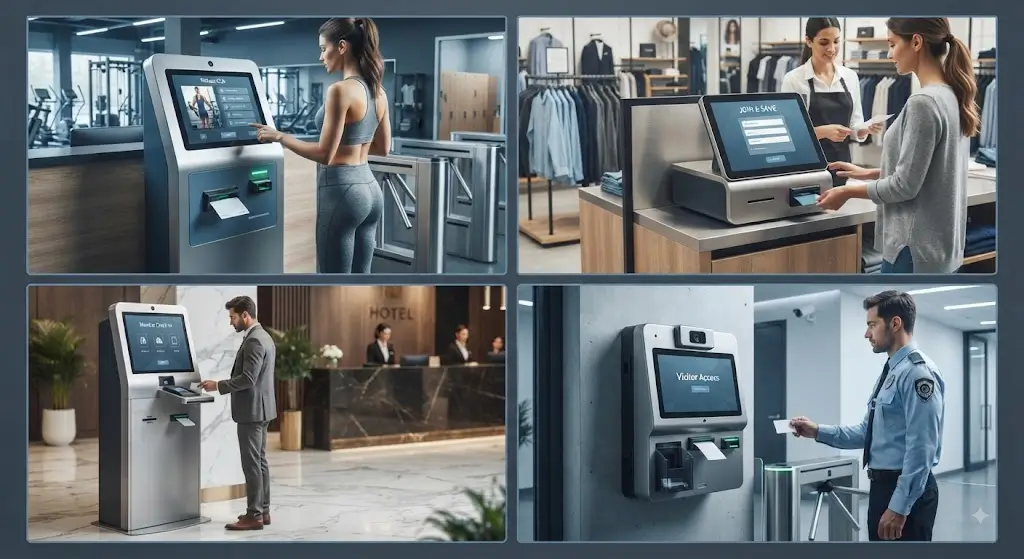
Membership Card Issuing Kiosk Applications
A membership card issuing kiosk can be deployed in different industries.
The hardware configuration should match the business workflow.
Fitness Club Membership Kiosk Solution
Customer Registration Challenges in Fitness Industry
Fitness clubs often need fast member registration while reducing front desk workload.
Traditional processes require:
- Staff registration
- Manual card preparation
- Customer waiting
A self-service membership kiosk allows customers to:
- Register membership
- Select plans
- Complete payment
- Receive membership cards
Recommended Hardware Configuration
For RFID Fitness Membership System:
- SNR-K750C RFID Card Dispenser
- RFID Reader/Writer Module
- Industrial Mini PC
For Magnetic Stripe Fitness Membership System:
- SNR-CD212-M8 Magnetic Stripe Card Dispenser
Benefits of Automated Fitness Membership Kiosks
- Faster customer onboarding
- Reduced reception workload
- 24/7 membership registration
- Consistent card issuing process
Retail Loyalty Card Issuing Kiosk Solution
Customer Requirement
Retail businesses use membership programs to increase repeat purchases and customer engagement.
A self-service loyalty kiosk can help customers:
- Register accounts
- Receive loyalty cards
- Activate membership
- Update information
Recommended Card Issuing Hardware
Modern RFID Loyalty Card System:
- SNR-K750C
- RFID module
- Industrial controller
Existing Magnetic Loyalty Card System:
- SNR-CD212-M8
Benefits for Retail Membership Programs
- Improved customer experience
- Reduced staff involvement
- Multi-location scalability
- Faster membership activation
Hospitality Membership and Guest Card Solution
Customer Requirement
Hotels, resorts and hospitality businesses increasingly use self-service terminals.
Possible workflows include:
- Guest registration
- Membership enrollment
- Loyalty program activation
- Credential issuing
Recommended Hardware Configuration
Permanent RFID Membership Cards:
- SNR-K750C
Reusable Guest credential programs:
- SNR-K750L
Benefits for Hospitality Self-Service Systems
- Faster guest service
- Reduced reception workload
- Improved self-service capability
Casino Loyalty Card Issuing Solution
Customer Requirement
Casinos and entertainment venues often require fast customer registration and loyalty card issuance.
Many existing systems still rely on magnetic stripe cards.
Recommended Card Issuing Direction
Magnetic Stripe Casino Loyalty Cards:
- SNR-CD212-M8
RFID Smart Loyalty Cards:
- SNR-K750C
Benefits of Automated Loyalty Card Issuing
- Faster player registration
- Automated card delivery
- Better customer experience
Access Control Membership Credential Solution
Customer Requirement
Some membership systems are connected with access control.
Examples:
- Fitness facilities
- Private clubs
- Corporate facilities
The issued card may be used for:
- Identification
- Facility access
- Member verification
Recommended Configuration
RFID credential system:
- SNR-K750C
- RFID reader/writer
Reusable access credential:
- SNR-K750L
Multi-Location Membership Deployment Considerations
For businesses deploying kiosks across multiple locations, hardware consistency becomes important.
Large deployments should consider:
- Same hardware platform
- Same software interface
- Simplified maintenance
- Spare parts availability
- Remote troubleshooting
A standardized hardware architecture helps reduce operational complexity after rollout.
Choosing the Right SNRO Solution
A simple selection approach:
| Project Requirement | Recommended Solution |
|---|---|
| New RFID membership platform | SNR-K750C |
| Existing magnetic stripe membership system | SNR-CD212-M8 |
| Temporary reusable cards | SNR-K750L |
| Complete kiosk integration | Add SNRO Industrial Mini PC |
| High-volume deployment | Evaluate complete kiosk workflow during pilot testing |
Important Project Note
The card dispenser should not be selected separately from the complete kiosk workflow.
Successful deployments usually evaluate:
- Actual membership card
- Card encoding method
- Software workflow
- Kiosk enclosure
- User interaction
- Maintenance process
A reliable membership kiosk is the result of matching the correct card technology, hardware mechanism and software integration.
Membership Card Issuing Kiosk Integration Workflow
Step 1 — Connect Membership Platform with Kiosk Application
The kiosk application needs to communicate with the existing membership or loyalty platform.
Typical data exchange includes:
- Customer information
- Membership level
- Registration status
- Card assignment
- Activation status
The integration method depends on the customer’s existing software architecture.
Common approaches include:
- REST API
- Database integration
- Cloud platform connection
- Local server communication
The goal is to ensure that every issued card is correctly linked with the customer’s membership account.
Step 2 — Select the Correct Card Technology
Before selecting hardware, confirm the card technology used by the project.
The main options include:
RFID Membership Cards
Suitable for:
- New loyalty systems
- Contactless membership programs
- Access control integration
Recommended:
SNR-K750C RFID Card Dispenser
Magnetic Stripe Membership Cards
Suitable for:
- Existing membership infrastructure
- Legacy loyalty systems
- Traditional customer cards
Recommended:
SNR-CD212-M8 Magnetic Stripe Card Dispenser
Reusable RFID Cards
Suitable for:
- Temporary credentials
- Shared membership cards
- Rental card workflows
Recommended:
SNR-K750L RFID Card Recycler
Integrate Card Personalization Process
Card personalization is an important part of automated membership issuing.
The workflow may include:
Card Detection
↓
Card Data Writing
↓
Card Verification
↓
Membership Account Linking
↓
Card IssuingThe kiosk may write customer information or credential data into the RFID chip.
For magnetic stripe systems:
The kiosk may encode required membership information onto the magnetic stripe.
The exact process depends on:
- Card type
- Data format
- Existing membership software
- Security requirements
Step 4 — Integrate Card Issuing Hardware
The kiosk application needs to control the physical card dispenser.
Typical commands include:
- Initialize device
- Check card availability
- Dispense card
- Collect card
- Read device status
- Handle errors
A complete integration should include not only successful issuing but also abnormal situations.
Step 5 — Design Error Recovery Workflow
Unattended kiosks must handle unexpected situations.
Common issues include:
- Card not detected
- Card issuing failure
- RFID writing error
- Communication interruption
- Customer leaves without collecting card
- Backend timeout
A reliable system should define:
- Retry logic
- User notification
- Operator alert
- Transaction recovery
Example:
Card Issuing Request
↓
Hardware Check
↓
Card Available?
↓
YES → Personalization → Issue Card
NO → Error Message → Operator Notification
Common Deployment Challenges in Membership Card Issuing Kiosks
Many kiosk projects pass laboratory testing but face problems after real deployment.
The difference is usually not the hardware itself.
It is the complete workflow design.
Challenge 1 — Choosing the Wrong Card Technology
One common mistake is selecting hardware before understanding the existing membership system.
For example:
A company already has millions of magnetic stripe membership records.
Replacing the entire system with RFID may create unnecessary cost and complexity.
The better approach is to select hardware that matches the existing business environment.
Recommended Approach
Before selecting hardware, confirm:
- Existing card type
- Customer database format
- Card replacement plan
- Future upgrade strategy
Challenge 2 — Poor Mechanical Integration
A dispenser may work correctly during testing but become difficult after installation.
Common problems include:
- Card outlet position is uncomfortable
- Card loading is inconvenient
- Service access is blocked
- Internal space is insufficient
The kiosk structure should be reviewed together with the dispenser before mass production.
Challenge 3 — Software Does Not Handle Hardware Status
A kiosk should know what happens inside the machine.
Important status information may include:
- Card available
- Card shortage
- Dispensing result
- Communication status
- Hardware error
Without proper status handling, the kiosk may appear frozen to customers even when the problem is recoverable.
Challenge 4 — No Real-World Pilot Testing
A successful prototype does not always guarantee successful deployment.
Before rollout, test:
- Real membership cards
- Real customer workflow
- Continuous issuing cycles
- Maintenance operations
- Error recovery process
Pilot testing helps identify issues before large-scale deployment.
Why Choose SNRO for Membership Card Issuing Kiosk Projects
SNRO focuses on self-service kiosk hardware integration.
Instead of providing only individual components, SNRO helps system integrators evaluate complete hardware solutions.
Complete Card Issuing Hardware Portfolio
SNRO provides:
- RFID card dispensers
- RFID card recyclers
- Magnetic stripe card dispensers
- Industrial mini PCs
- Kiosk printers
- Self-service kiosk hardware modules
This allows partners to select hardware based on real project requirements.
Support Multiple Card Technologies
Different markets and industries use different membership card systems.
SNRO supports:
- RFID membership solutions
- Magnetic stripe membership solutions
- Reusable card management solutions
This gives system integrators more flexibility when working with different customers.
Designed for System Integration
SNRO products are designed for integration into:
- Self-service kiosks
- Retail terminals
- Hospitality systems
- Access control terminals
- Loyalty platforms
Important project considerations include:
- Hardware communication
- Mechanical integration
- Deployment reliability
- Long-term maintenance
Engineering Support During Project Development
For OEM and system integration projects, hardware selection is only the beginning.
SNRO can support evaluation of:
- Product selection
- Interface requirements
- Prototype testing
- Integration issues
- Deployment planning
Frequently Asked Questions About Membership Card Issuing Kiosks
What is a membership card issuing kiosk?
A membership card issuing kiosk is a self-service terminal that allows customers to register, verify information and automatically receive membership cards without staff assistance.
Can a membership kiosk issue both RFID and magnetic stripe cards?
Yes. The correct hardware depends on the card technology used by the membership system.
SNRO provides:
- RFID card issuing solutions
- Magnetic stripe card issuing solutions
- RFID recycling solutions
Which SNRO product should I choose for RFID membership cards?
For permanent RFID membership cards, SNR-K750C is a suitable solution direction.
For reusable RFID cards, SNR-K750L can be evaluated.
The final selection depends on the complete workflow.
Can SNRO support magnetic stripe membership card systems?
Yes. SNR-CD212-M8 is designed for projects requiring automated magnetic stripe card issuing.
It is suitable for applications using existing magnetic membership or loyalty systems.
Should membership cards be permanent or reusable?
It depends on the business model.
Permanent cards are common for:
- Fitness memberships
- Retail loyalty cards
- Customer identification
Reusable cards are common for:
- Temporary access
- Visitor systems
- Shared credentials
What information should I provide before selecting a card issuing solution?
System integrators should provide:
- Card type
- Card size and thickness
- Existing software platform
- Issuing workflow
- Expected daily volume
- Kiosk drawing
- Operating system
- Interface requirements
This information helps select the correct hardware configuration.
Request a Membership Card Issuing Kiosk Hardware Recommendation
Building a reliable membership card issuing kiosk requires matching the correct card technology, software workflow and hardware configuration.
If you are developing:
- Loyalty card kiosks
- Fitness membership terminals
- Retail self-service kiosks
- Hospitality membership systems
- Access credential terminals
SNRO can help evaluate a practical hardware configuration for your project.
Please share:
- Card type
- Application scenario
- Kiosk design
- Required functions
- Expected quantity
Our engineering team can recommend suitable card issuing hardware for prototype testing and production deployment.
Related Resources
Card Dispenser Solutions
Self-Service Kiosk Solutions
- Retail Self-Service Kiosk Solution
- Hotel Self Check-In Kiosk Hardware
- Visitor Management Kiosk Solution
- Access Control Kiosk Solution


