


Self-ordering Kiosk Hardware System Solution
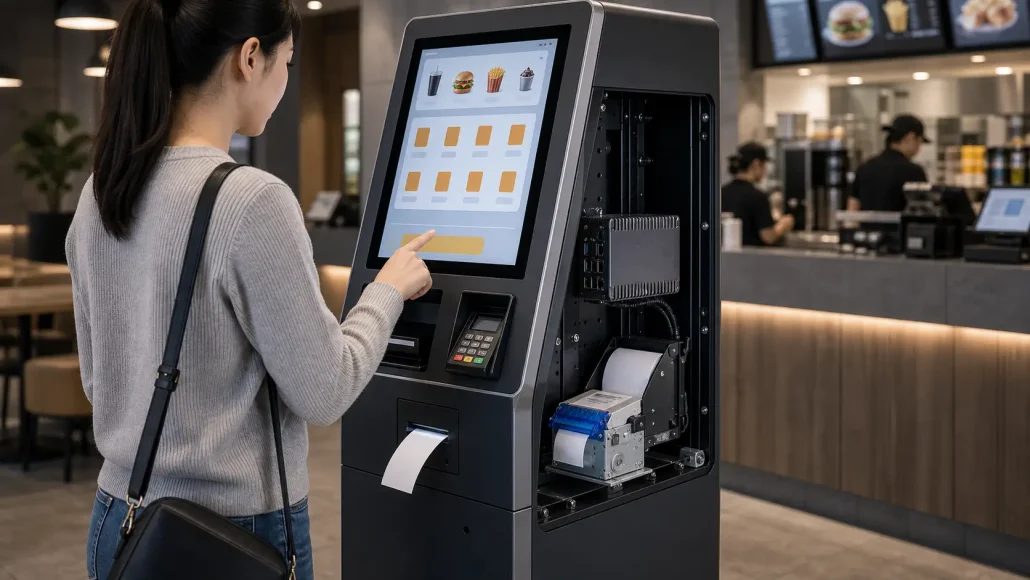
Introduction
Most self-ordering kiosk problems do not appear when a single device is tested on a desk.
They appear later, when the restaurant is busy, orders are coming in quickly, payment confirmation must synchronize with the POS system, and the receipt or pickup ticket still needs to print without slowing the line.
In a controlled test, the workflow looks simple: touch, order, pay, print, and finish.
In a real restaurant, QSR, food court, or retail ordering environment, the hardware system has to repeat that workflow hundreds or thousands of times. The touchscreen, printer, scanner, payment terminal, industrial controller, POS platform, and kitchen system must stay coordinated under real operating pressure.
That is why a self-ordering kiosk should not be planned as a screen with several accessories attached. It should be planned as a complete hardware transaction system.
SNRO provides self-ordering kiosk hardware system support for kiosk manufacturers, restaurant technology integrators, OEM terminal builders, and self-service solution providers that need stable ordering, payment, receipt output, QR code verification, and controller integration in real deployments.
Solution Summary
A self-ordering kiosk hardware system solution connects the core hardware modules required for unattended ordering and transaction processing.
The exact hardware list depends on the restaurant format, payment workflow, cabinet structure, and POS integration plan.
A complete system may include:
– Touchscreen ordering terminal
– Embedded kiosk printer, presenter printer, or panel mount printer
– Payment terminal for card, mobile, or other payment workflows
– Fixed mount QR code or barcode scanner
– Industrial mini PC or embedded controller
– POS or cloud ordering platform
– Kitchen display system or backend order system
– Network, power, enclosure, and maintenance structure
These modules should be reviewed as one transaction system, because a delay in one device can affect the full ordering flow.
The system only works well when these modules communicate reliably across the complete transaction workflow.
For project teams, the key question is not only whether each device works alone. The real question is whether the complete kiosk can process orders, confirm payments, print receipts, read QR codes, send orders to the kitchen, recover from exceptions, and stay serviceable during daily operation.
Why This Application Matters
Self-ordering kiosks are often installed to reduce queue pressure, improve ordering consistency, support digital payment, and keep staff focused on food preparation or service.
When the hardware system is planned correctly, the kiosk can support a smooth customer flow:
– The customer selects items on the screen.
– The POS or cloud system confirms the order.
– The payment terminal completes the transaction.
– The printer outputs a receipt, pickup ticket, or order record.
– The scanner verifies coupons, membership codes, or pickup references where needed.
– The kitchen or backend system receives the order.
– The kiosk software receives status feedback from connected modules.
When one step becomes unstable, the whole user experience is affected.
A delayed receipt may make the customer repeat an action. A scanner that reads slowly may create hesitation. A payment confirmation delay may create duplicate order risk. A printer that cannot report paper status may leave the kiosk unavailable during a busy service window.
In high-volume ordering environments, small hardware coordination problems quickly become operational problems.
Typical Challenges
Peak-Hour Transaction Pressure
Self-ordering kiosks are often used most heavily during lunch, dinner, event, or retail rush periods.
During these windows, the system needs stable response across the touchscreen, payment terminal, printer, scanner, controller, POS platform, and backend system.
A single device may pass a bench test, but the complete kiosk still needs to be tested under repeated ordering conditions.
Payment and POS Synchronization
Payment confirmation must match the order status. If the payment terminal confirms a transaction but the POS or cloud system is delayed, the customer may see an uncertain state.
The printer is often affected by this timing. It may not print until payment and order validation are complete.
From the engineering side, nothing may be broken. From the customer’s side, the kiosk feels slow or unreliable.
Receipt and Pickup Ticket Output
In many self-ordering systems, the printer is the final visible step of the transaction.
It may print a full payment receipt, short pickup ticket, queue number, QR code receipt, kitchen reference, or service confirmation.
Printer selection should consider paper width, cutter or presenter behavior, driver support, command response, mounting structure, paper loading, and service access.
For printer-specific selection details, use the **Self-Ordering Kiosk Printer Solution** and **Food Ordering Kiosk Printer Guide** as supporting resources.
QR Code and Barcode Verification
Self-ordering kiosks may use scanners for coupons, mobile order verification, membership codes, pickup codes, loyalty programs, or staff service actions.
Scanner position, reading angle, lighting conditions, code size, software response, and interface support should be confirmed before the kiosk front panel is finalized.
Cabinet Space and Maintenance Access
Restaurant and retail kiosks often have limited internal space. The cabinet may need to hold a printer, paper roll, scanner, payment terminal, controller, power supply, cables, ventilation structure, and service access points.
If paper replacement, scanner access, or cable service requires too much disassembly, field operation becomes harder after rollout.
Software, Driver, and Interface Matching
The hardware system may use Windows, Linux, Android, or an embedded controller platform.
Printers, scanners, payment terminals, and controllers may require USB, RS232, Ethernet, or other communication interfaces.
Driver, SDK, command, and status feedback support should be checked before prototype hardware is approved.
These issues are why experienced teams usually review the kiosk as a complete transaction system before approving the hardware list.
What Experienced Integrators Usually Consider
Experienced self-ordering kiosk teams usually start with the transaction workflow, then approve hardware around that workflow.
Key review questions include:
– What ordering flow will the kiosk support?
– Will payment be handled by card, mobile, QR code, or an external payment module?
– What type of receipt, ticket, or pickup slip will be printed?
– Does the printer need standard cutter output, presenter output, or panel mount integration?
– Will the kiosk scan coupons, mobile codes, membership codes, or pickup codes?
– What operating system will run the kiosk software?
– What interfaces are available on the controller?
– Does the POS or cloud system introduce queue or confirmation delays?
– Can the software receive printer and scanner status feedback?
– Can staff replace paper without opening a difficult cabinet?
– Can the same hardware layout support pilot testing and rollout?
The best hardware system is not the one with the highest specification for each device. It is the system that keeps the ordering workflow stable, serviceable, and repeatable.
Recommended Hardware Architecture
The table below shows how each hardware layer contributes to the complete ordering workflow. It is useful for early project discussion between the mechanical, electrical, software, and operations teams.
| System Layer | Typical Hardware | Main Responsibility |
|---|---|---|
| User Interface Layer | Touchscreen terminal | Customer ordering, browsing, and interaction with the system UI |
| Order Processing Layer | POS system / cloud ordering platform | Menu management, cart processing, order creation, and transaction logic |
| Payment Layer | Card payment terminal / mobile payment module | Payment authorization, confirmation, and transaction response handling |
| Output Layer | Kiosk printer / panel mount printer | Receipt, pickup ticket, order number, or transaction reference printing |
| Verification Layer | Fixed-mount barcode / QR scanner | Coupon validation, membership verification, pickup code, or mobile QR reading |
| Control Layer | Industrial mini PC / embedded controller | Device coordination, software execution, and peripheral interface management |
| Backend Layer | Kitchen display system / backend server | Order routing, kitchen workflow, fulfillment tracking, and status updates |
| Maintenance Layer | Cabinet structure / service door / cable routing system | Paper replacement, maintenance access, and long-term field service support |
This structure also helps project teams identify where a delay or service issue may appear before the kiosk enters pilot testing.
This layered view helps teams avoid one common mistake: selecting hardware devices separately and only later discovering that the cabinet, software, interface, or maintenance plan does not support the complete workflow.
Hardware Components Frequently Used
Touchscreen Ordering Terminal
The touchscreen is the customer-facing interface. Its response speed affects how fast the kiosk feels, even when the backend system is doing the real transaction work.
For self-ordering projects, screen size, mounting angle, touch sensitivity, enclosure design, and software responsiveness should be tested with the actual ordering flow.
Kiosk Printer
The printer is usually the final visible execution point of the order.
It may output:
– Full payment receipts
– Pickup tickets
– Queue numbers
– QR code receipts
– Order confirmations
– Kitchen reference slips
– Service confirmation records
For compact kiosks, a panel mount printer may fit the front panel better. For full-size ordering kiosks, an embedded 80mm kiosk printer may provide more receipt layout space. For higher-traffic or unattended systems, presenter output may be evaluated if receipt handling needs more control.
Payment Terminal
The payment terminal must synchronize with the POS or cloud ordering platform.
Project teams should confirm payment status handling, transaction timeout behavior, software callbacks, and the sequence between payment confirmation, receipt output, and backend order submission.
Fixed Mount QR Code or Barcode Scanner
Scanners support mobile payment codes, coupons, loyalty membership, pickup verification, staff service codes, or order lookup workflows.
Scanner selection should consider reading distance, reading angle, installation position, illumination, code type, host interface, and software response time.
Industrial Mini PC or Controller
The industrial controller coordinates the kiosk software and connected hardware modules.
For restaurant and retail environments, the controller should support the selected operating system, available interfaces, stable continuous operation, and enough performance margin for the ordering software and peripheral communication.
POS, Cloud Ordering, and Kitchen System
The POS or cloud ordering system is the logic center of the workflow.
Hardware planning should include how the kiosk sends orders, receives payment status, triggers printer output, updates queue or pickup status, and communicates with the kitchen display system or backend fulfillment system.
Recommended SNRO Hardware Shortlist
The following SNRO hardware can be used as practical starting points for self-ordering kiosk projects. The final configuration should match the kiosk structure, receipt sample, scanner workflow, controller platform, interface requirements, and expected deployment quantity.
SNR-KP800-VX 80mm Kiosk Printer
Recommended for self-ordering kiosk projects that need 80mm receipt output, embedded installation, and stable receipt handling in restaurant, QSR, retail ordering, and payment workflows.
It can be evaluated when the receipt includes order details, payment information, QR codes, store information, or service references.
SNR-KP802-VX Presenter Kiosk Printer
Recommended for higher-traffic or more unattended self-ordering systems where receipt delivery needs more control.
It can be evaluated when users may pull paper early, receipts may be left at the output slot, or receipt handling reliability is a key project concern.
SNR-EP8303 80mm Panel Mount Printer
Recommended for compact restaurant ordering kiosks, integrated POS terminals, counter service machines, and front-panel printer integration.
It can be evaluated when the kiosk cabinet needs a clean front outlet, compact mounting structure, and practical paper loading access.
SNR-EP8280 Fixed Mount Barcode Scanner
Recommended for QR code coupon scanning, mobile order verification, membership code reading, pickup code verification, and related self-ordering workflows.
Scanner installation should be checked with the real code size, reading angle, front panel design, and software response.
SNR-N8P Fanless Industrial Mini PC
Recommended as a control platform option for self-ordering kiosks that need to connect printers, scanners, payment terminals, POS software, and backend ordering systems.
The controller choice should be confirmed against operating system, interface count, installation space, thermal environment, and software performance requirements.
Deployment Reality
Self-ordering kiosk hardware often works well during a short demonstration. Real deployment is different.
During peak ordering periods, the kiosk may process many transactions in a short time. Users may tap quickly, retry if they feel unsure, scan codes at different angles, or expect the receipt to appear immediately after payment.
Operators also need a system that is easy to service. Paper replacement, scanner cleaning, cable checking, and module replacement should not require unnecessary disassembly.
Before rollout, project teams should test:
– Real menu and receipt data
– Longest receipt or pickup ticket format
– Payment confirmation timing
– POS or cloud order synchronization
– Printer output timing
– QR code and barcode scanning
– Paper replacement process
– Error recovery and status feedback
– Peak transaction simulation
– Service access inside the cabinet
The goal is not only to prove that each device works. The goal is to confirm that the complete system remains stable during real ordering conditions.
Typical Projects We Support
SNRO self-ordering kiosk hardware system support is suitable for:
– Restaurant self-ordering kiosks
– QSR ordering terminals
– Food court ordering and payment kiosks
– Retail ordering stations
– Counter service self-ordering terminals
– Compact wall-mounted ordering machines
– Pickup and queue number kiosks
– Self-service payment and receipt output terminals
– OEM ordering kiosk hardware projects
– Multi-location restaurant kiosk rollout projects
Pre-Deployment Hardware Planning Checklist
Before approving the hardware list, it is useful to review the project from workflow, enclosure, software, and maintenance perspectives. The checklist below can be used during prototype planning or supplier communication.
| Check Item | Why It Matters |
|---|---|
| Transaction workflow | Confirms full system sequence including ordering, payment, printing, scanning, and backend processing |
| Peak order volume | Helps evaluate controller performance, printer throughput, and overall system responsiveness |
| Receipt or ticket sample | Defines printer width, QR/barcode layout, content density, and output format |
| Printer installation method | Determines whether embedded, panel mount, or presenter-style printer is required |
| Scanner requirement | Confirms code type, reading distance, installation position, and interface compatibility |
| Payment environment | Defines integration timing between payment terminal and order confirmation flow |
| POS or cloud platform | Impacts order synchronization logic, receipt trigger timing, and kitchen routing structure |
| Operating system | Determines driver support, SDK availability, and controller compatibility |
| Interface plan | Prevents conflicts between USB, serial, Ethernet, and power distribution design |
| Cabinet drawing | Validates module depth, paper roll space, cable routing, and internal mechanical layout |
| Maintenance access | Reduces service time and operational downtime after deployment |
| Pilot quantity | Ensures hardware consistency and stability before full-scale rollout |
If several items are still unclear, the project is probably not ready for final hardware approval. It is better to confirm these details before cabinet tooling or batch purchasing.
Technical Resources / Downloads
Project teams may need technical documents during prototype and integration review.
Common resource requests include:
– Printer driver and SDK resources
– Scanner communication documents
– Industrial PC interface information
– Mechanical drawings and CAD files
– User manuals
– Command or protocol documents
– Wiring and installation references
– Product datasheets
Recommended support link targets:
– Driver and SDK Download Center
– Kiosk Printer SDK Guide
– Linux Kiosk Printer Integration Guide
– Kiosk Printer Hub
Why SNRO
SNRO supports self-service hardware projects from the system integrator and OEM hardware perspective.
Instead of treating each module as an isolated component, we help project teams review how printers, scanners, controllers, payment devices, and kiosk software requirements fit into the complete terminal workflow.
For self-ordering kiosk projects, SNRO can support:
– Printer model evaluation
– Panel mount and embedded printer options
– Presenter printer evaluation for controlled receipt output
– Fixed mount scanner selection
– Industrial mini PC reference planning
– Driver, SDK, and technical document support
– Prototype hardware review
– Multi-location rollout hardware consistency
Related Resources
– Self-Ordering Kiosk Printer Solution
– Food Ordering Kiosk Printer Guide
– Food Service Kiosk Printer Guide
– Panel Mount Printer Guide for Compact Ordering Kiosks
– Kiosk Printer Hub
– Kiosk Printer Buying Guide
– Presenter Printer vs Auto Cutter Printer Guide
– Linux Kiosk Printer Integration Guide
– Kiosk Printer SDK Guide
Related Solutions
– Self-Checkout Hardware Solutions
– Queue Management System Hardware Solutions
– Ticket Vending Machine Hardware Solutions
– Hotel Self Check-In Hardware Solutions
– Banking Self-Service Terminal Hardware Solutions
– Visitor Management Kiosk Hardware Solutions
Need Help Planning Your Self-Ordering Kiosk Hardware System?
Share your transaction workflow, receipt sample, printer installation method, scanner requirement, payment environment, operating system, POS or cloud platform, cabinet drawing, and expected peak transaction volume. SNRO can help you review the printer, scanner, industrial controller, and integration hardware direction before prototype testing.
Request Self-Ordering Kiosk Hardware Recommendation
FAQ
What is a self-ordering kiosk hardware system?
A self-ordering kiosk hardware system is a multi-device architecture that connects the touchscreen, printer, payment terminal, scanner, industrial controller, POS platform, and backend order system to support unattended ordering and transaction processing.
What hardware is usually used in a self-ordering kiosk?
A typical self-ordering kiosk may include a touchscreen terminal, embedded or panel mount printer, payment terminal, fixed mount QR code scanner, industrial mini PC, POS or cloud ordering software, and kitchen display or backend system.
Why do self-ordering kiosk projects fail in real deployment?
Many issues come from system coordination problems rather than one defective device. Payment confirmation, POS response, receipt output, scanner reading, backend synchronization, and maintenance access all need to be planned together.
Is the printer the most important component in a self-ordering kiosk?
The printer is important because it is often the final visible step of the transaction, but it is not the only critical component. System synchronization between payment, POS, printer, scanner, controller, and backend workflow is more important than any single module.
Should a self-ordering kiosk use a panel mount printer or embedded kiosk printer?
Panel mount printers are often useful for compact or front-panel integrated kiosks. Embedded kiosk printers are often used in larger enclosed systems. The choice depends on cabinet structure, receipt format, paper loading, output slot, and service access.
When should a presenter printer be used in a self-ordering kiosk?
A presenter printer can be evaluated when the kiosk is unattended, transaction volume is high, users may pull receipts early, or controlled paper output is important for the service workflow.
What role does a fixed mount scanner play in a self-ordering kiosk?
A fixed mount scanner can read QR coupons, mobile order codes, loyalty membership codes, pickup codes, and staff service codes. Its position, reading angle, interface, and software response should be tested during prototype development.
What information should I provide for a self-ordering kiosk hardware recommendation?
Provide the transaction workflow, receipt or ticket sample, cabinet drawing, printer installation method, scanner requirement, payment environment, operating system, interface plan, POS or cloud platform, expected transaction volume, and pilot quantity.


