Blog
Handheld Android POS Deployment Guide for Restaurants and Retail Businesses
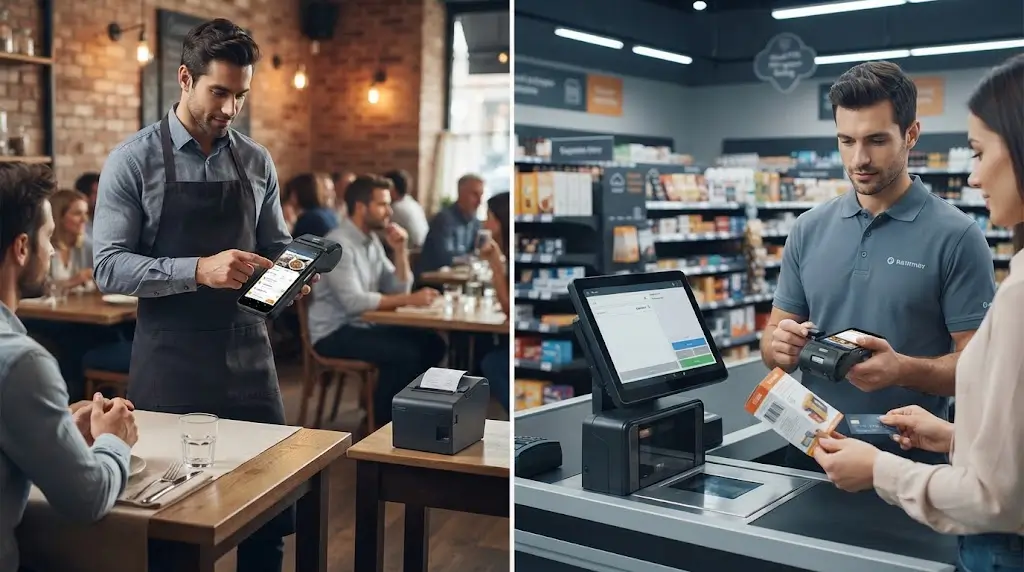
Handheld POS terminals are becoming an important part of modern restaurant and retail operations.
However, successful deployment is not simply about replacing a traditional POS terminal with a smaller mobile device.
In real projects, the hardware needs to fit the complete business workflow.
A restaurant may need staff to take orders directly at tables.
A retail store may want employees to assist customers and complete transactions anywhere on the sales floor.
A delivery or field-service business may require mobile payment and receipt capability outside a fixed location.
These applications all have one common requirement:
The transaction process needs to become more flexible.
A handheld POS terminal provides this flexibility by bringing the POS system closer to the customer.
Before selecting the right hardware, many businesses first need to understand different Android POS platforms and configuration options.
However, during actual deployment, many factors influence long-term performance:
- POS software compatibility
- Wireless communication stability
- Battery management
- Printing requirements
- Barcode and QR scanning
- Payment integration
- Future expansion capability
From our experience working with different self-service and POS hardware projects, the biggest challenges usually appear after installation.
A device may work perfectly during a demonstration.
But commercial deployment requires hardware that can support daily operation, employee usage and long-term maintenance.
This guide explains how businesses deploy handheld Android POS systems in restaurant and retail environments, and what system integrators should consider before selecting hardware.
Why Businesses Are Moving from Fixed POS to Handheld POS
Traditional POS systems are usually built around a fixed checkout location.
The employee stays near the terminal.
Customers move toward the payment point.
This model remains effective for many businesses.
However, many modern operations require a more flexible transaction process.
Customers increasingly expect faster service.
Employees need access to sales information wherever they are.
Businesses want to reduce unnecessary movement during daily operations.
This is where handheld POS systems provide practical value.
Bringing Transactions Closer to Customers
The main advantage of handheld POS is not simply portability.
The real benefit is that employees can complete more tasks without returning to a fixed workstation.
For example:
In a restaurant:
Customer table
↓
Staff takes order
↓
Order sent to kitchen system
↓
Payment completed
In a retail environment:
Customer inquiry
↓
Employee checks product information
↓
Order or payment completed
The transaction becomes part of the customer interaction instead of a separate checkout process.
Supporting More Flexible Business Operations
Different industries have different reasons for adopting handheld POS.
Restaurants mainly focus on:
- Faster table service
- Reduced order errors
- Better peak-hour efficiency
Retail businesses often focus on:
- Mobile checkout
- Product information lookup
- Inventory assistance
Field applications may require:
- Outdoor transactions
- Mobile payment
- Printed confirmation
Because the workflow is different, the hardware configuration should also be different.
A successful handheld POS project starts with understanding the operation scenario.
Handheld POS Deployment in Restaurant Operations
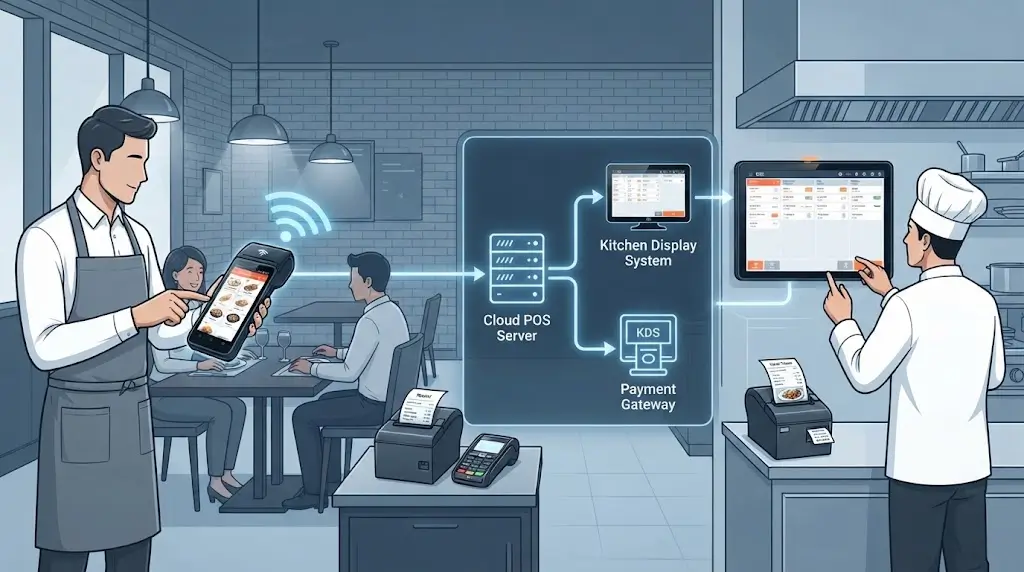
Restaurants are one of the most common applications for handheld POS terminals.
However, the best results come from designing the complete workflow rather than simply adding mobile devices.
From Counter Ordering to Table-Side Service
Many restaurants still operate with a fixed POS workflow.
The process is usually:
Customer orders
↓
Staff records information
↓
Employee returns to POS counter
↓
Order entered into system
↓
Kitchen receives request
This approach works for small restaurants.
However, during busy periods, several problems appear:
- Staff spend more time walking
- Order entry becomes slower
- Errors become more difficult to manage
- Customer waiting time increases
A handheld POS system changes this process.
The employee can complete the order process directly where the customer is located.
The workflow becomes:
Customer table
↓
Order entered through handheld POS
↓
Kitchen receives order information
↓
Payment processed
↓
Receipt provided if required
The improvement comes from reducing unnecessary steps.
Choosing the Right Handheld POS Configuration for Restaurants
Not every restaurant requires the same type of handheld POS.
The correct configuration depends on the actual workflow.
Order Entry Focused Applications
Some restaurants mainly need handheld devices for:
- Menu browsing
- Order input
- Customer requests
- Kitchen communication
In these cases, a compact handheld Android POS terminal is often enough.
The priority is:
- Comfortable operation
- Stable connection
- Easy software integration
For this type of application, a model such as SNR-Z108 can provide a flexible platform for mobile ordering workflows.
Payment and Receipt Required Applications
Some restaurants want employees to complete the entire transaction process at the table.
The device may need:
- Payment support
- Receipt printing
- Customer transaction confirmation
In these situations, a handheld POS terminal with integrated printing can simplify the deployment.
Models such as:
- SNR-Z90
- SNR-Z92
are suitable for applications where printing is part of the daily workflow.
Restaurant Deployment Challenges After Installation
Many handheld POS projects perform well during initial testing.
The real challenges usually appear during daily operation.
Wireless Coverage
Restaurants often have complex environments:
- Multiple rooms
- Different floors
- High customer density
Stable communication between handheld devices and backend systems is essential.
Battery Management
A restaurant may operate for many hours every day.
A practical deployment needs to consider:
- Charging location
- Number of devices
- Employee usage patterns
Battery planning should be part of the initial system design.
Employee Operation
A handheld POS terminal is used continuously by employees.
The device should support:
- Fast operation
- Comfortable handling
- Simple workflow
The best hardware is not always the one with the highest specifications.
It is the one that fits the working environment.
Retail Mobile POS Deployment
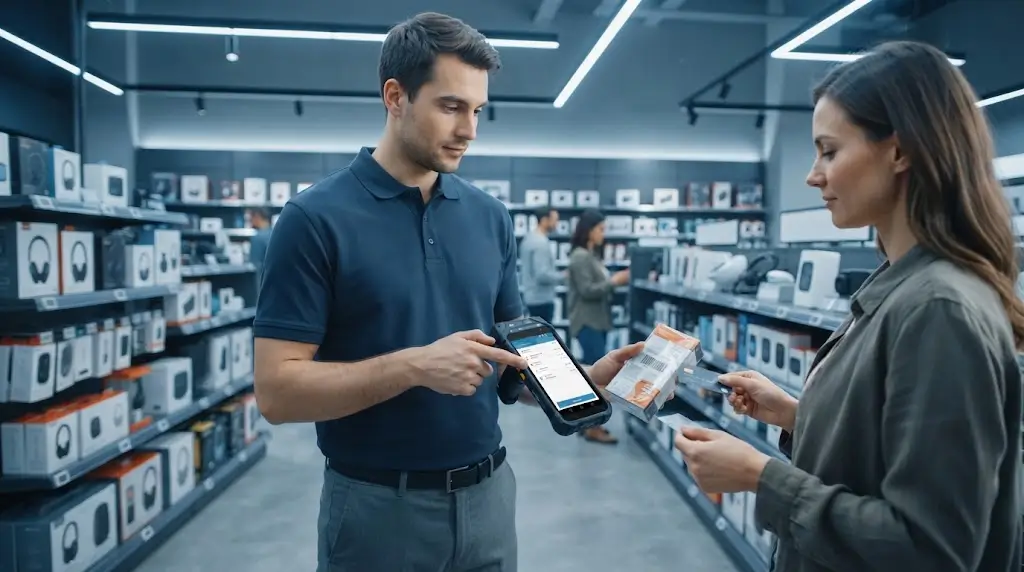
Retail environments have different requirements compared with restaurants.
Restaurants usually focus on order speed and table service.
Retail businesses often focus on customer assistance, inventory visibility and flexible checkout.
In many stores, the customer journey does not always happen near the cashier.
A customer may ask about:
- Product availability
- Alternative options
- Stock status
- Promotions
- Order details
If employees must return to a fixed POS station for every task, the sales process becomes slower.
A handheld POS terminal allows employees to provide service directly on the sales floor.
Supporting Mobile Checkout During Peak Hours
One of the biggest advantages of handheld POS deployment is improving checkout flexibility.
During busy periods, fixed checkout counters can become a bottleneck.
Typical examples include:
- Shopping malls during holidays
- Brand stores with high customer traffic
- Temporary sales events
- Exhibition environments
Instead of adding permanent checkout stations, businesses can deploy handheld POS terminals as additional mobile transaction points.
The workflow becomes:
Customer selects products
↓
Employee assists customer
↓
Transaction completed on handheld POS
↓
Receipt or digital confirmation provided
This approach allows businesses to handle changing customer demand without major changes to existing infrastructure.
Inventory and Sales Assistance on the Store Floor
Modern retail POS systems are no longer limited to payment processing.
Employees increasingly need access to business information wherever they work.
A handheld POS terminal can support:
- Product barcode scanning
- Inventory checking
- Customer order creation
- Price confirmation
- Mobile payment
For example, in a showroom environment, customers may need product information before making a purchase decision.
Employees can check availability and complete the order without leaving the customer.
This creates a smoother sales experience.
Handheld POS With Printer vs Without Printer
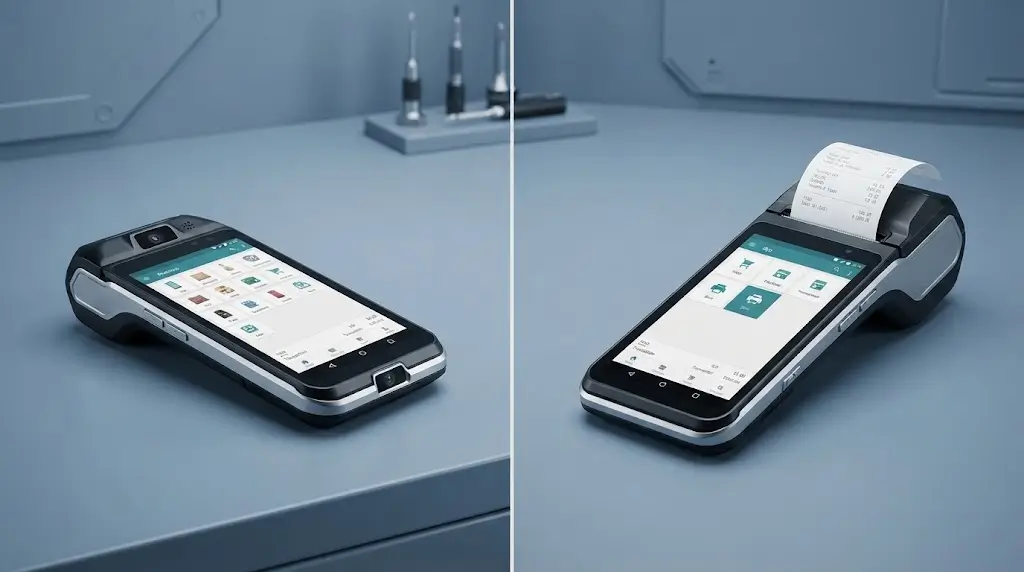
One of the most common questions during handheld POS projects is whether the terminal should include an integrated printer.
The answer depends on the transaction workflow.
A printer is not always necessary.
But in some applications, it can significantly simplify daily operations.
Handheld POS Without Integrated Printer
A printer-free handheld POS configuration is commonly used when the main purpose is:
- Mobile ordering
- Customer assistance
- Inventory operations
- Digital transaction management
The advantages include:
- More compact design
- Lower weight
- Easier daily handling
- Lower hardware complexity
Typical applications:
Restaurant Order Taking
The employee mainly needs to:
- Select menu items
- Send orders to kitchen system
- Update customer requests
A separate receipt printing process may already exist.
Retail Mobile Assistance
Employees may mainly use the device for:
- Product search
- Inventory checking
- Customer support
In these cases, adding a printer may not provide additional value.
SNR-Z108 Handheld Android POS Terminal
For mobile applications where flexibility and portability are the priority, SNR-Z108 provides a practical handheld POS platform.
It is suitable for projects requiring:
- Android application support
- Mobile operation
- Wireless communication
- Optional scanning functions
- Flexible software integration
Typical applications include:
- Restaurant ordering
- Retail sales assistance
- Inventory checking
- Mobile business applications
For system integrators, SNR-Z108 provides a flexible hardware foundation that can adapt to different software environments.
Handheld POS With Integrated Printer
Some business scenarios still require physical receipts.
Similar requirements also appear in self-service terminals and kiosk applications where reliable receipt printing is critical.
Examples include:
- Restaurant customer receipts
- Delivery confirmation
- Field service records
- Mobile payment transactions
In these cases, an integrated printer can simplify the complete workflow.
Instead of managing:
Handheld terminal
External printer
Connection management
the employee can complete the transaction and print immediately from one device.
SNR-Z90 Mobile POS Terminal with Printer
SNR-Z90 is designed for applications where mobile operation and receipt printing are both required.
Typical deployment scenarios include:
- Restaurant table-side payment
- Delivery transactions
- Mobile retail checkout
- Field sales applications
The integrated printer reduces the need for additional equipment and helps create a more complete mobile transaction workflow.
SNR-Z92 Smart Android Mobile POS Terminal
Some projects require more than basic mobile ordering or payment.
They need a complete handheld transaction device.
SNR-Z92 is designed for applications requiring:
- Mobile POS operation
- Integrated printing
- Customer interaction
- Flexible deployment
Typical applications include:
- Restaurants
- Hospitality environments
- Retail mobile checkout
- Event transactions
For solution providers, this type of configuration can reduce integration complexity by combining multiple functions into one terminal.
How System Requirements Decide the Right Handheld POS Configuration
A common mistake in POS projects is choosing hardware before defining the workflow.
The better approach is:
Business process
↓
Software requirements
↓
Peripheral requirements
↓
Hardware configuration
Scenario 1: Mobile Order Entry
Requirements:
- Order input
- Kitchen communication
- Customer service
Recommended direction:
SNR-Z108
Scenario 2: Order + Receipt Printing
Requirements:
- Complete transaction at customer location
- Physical receipt
- Mobile operation
Recommended direction:
SNR-Z90 / SNR-Z92
Scenario 3: Retail Mobile Checkout
Requirements:
- Barcode scanning
- Inventory connection
- Customer assistance
- Payment support
Recommended direction:
Customized handheld POS configuration based on software and peripheral requirements.
What We Have Learned From Real Handheld POS Deployments
In real projects, the biggest differences usually appear after installation.
A device may perform well during a short test.
However, daily operation introduces new challenges:
- Different employee habits
- Network changes
- Long working hours
- Charging management
- Software updates
- Expansion requirements
This is why experienced system integrators evaluate the complete deployment environment before selecting hardware.
The goal is not only to make the device work.
The goal is to make the whole system reliable after months or years of operation.
How System Integrators Should Evaluate Handheld POS Hardware
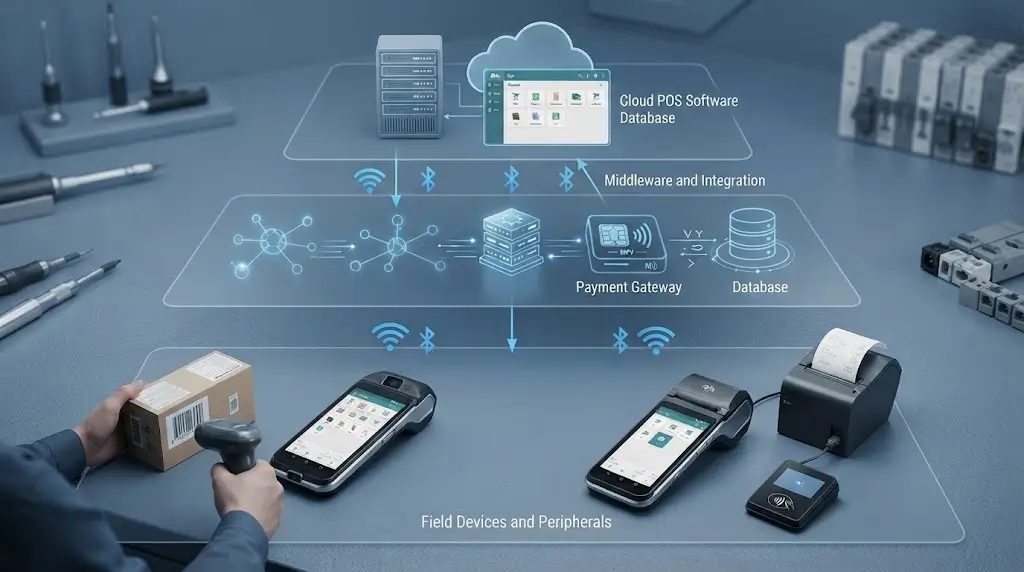
For system integrators, selecting handheld POS hardware is not only a product decision.
It is a solution design decision.
A handheld POS terminal needs to work together with:
- POS software
- Payment systems
- Backend platforms
- Peripheral devices
- Network infrastructure
- Daily operation processes
Many projects experience problems because hardware evaluation starts too late.
The device may pass a basic test.
However, issues appear when the system enters real operation:
- Software compatibility problems
- Unstable communication
- Difficult maintenance
- Limited expansion capability
Experienced integrators usually evaluate the complete deployment environment before confirming the final hardware configuration.
Step 1: Understand the Complete Business Workflow
Before selecting a handheld POS terminal, the first question should not be:
“What device specifications do we need?”
The better question is:
“What does the employee need to complete during the transaction?”
Different applications create different requirements.
Restaurant Workflow Example
A typical restaurant deployment may include:
Customer
↓
Staff member takes order
↓
POS application processes order
↓
Kitchen system receives information
↓
Payment completed
↓
Receipt printed if required
Based on this workflow, the hardware requirements may include:
- Fast application response
- Stable wireless communication
- Comfortable handheld design
- Optional printing capability
Retail Workflow Example
A retail deployment may include:
Customer inquiry
↓
Employee checks product information
↓
Barcode scanned
↓
Inventory confirmed
↓
Payment completed
The required hardware may focus more on:
- Scanning capability
- Inventory integration
- Mobile checkout flexibility
The hardware configuration should always follow the workflow.
Step 2: Confirm Software Compatibility
In commercial POS projects, hardware is only one part of the complete solution.
The handheld POS terminal must work correctly with the customer’s software environment.
Important evaluation points include:
- Android OS compatibility
- Application installation requirements
- SDK availability
- API communication
- Peripheral control
- Printer commands
A device that performs well independently may still fail if it cannot communicate properly with the customer’s software platform.
Step 3: Evaluate Network and Communication Requirements
Connectivity is one of the most important factors in handheld POS deployment.
Unlike fixed POS terminals, handheld devices depend heavily on wireless communication.
Common communication options include:
- Wi-Fi
- Bluetooth
- 4G/LTE
- Cloud connection
The correct solution depends on the application environment.
Restaurant Network Considerations
Restaurants often have challenging environments:
- Multiple dining areas
- Different floors
- High customer density
- Busy operating periods
A handheld POS system needs reliable communication between:
- POS application
- Cloud platform
- Kitchen system
- Payment system
Poor network planning can affect the entire customer experience.
Retail Network Considerations
Retail stores may require handheld POS terminals to operate across:
- Large sales areas
- Multiple departments
- Warehouses
- Temporary sales locations
Before deployment, integrators should consider:
- Wireless coverage
- Connection stability
- Device roaming
- Backup communication methods
Step 4: Consider Battery Management and Device Operation
Battery performance is often underestimated during early testing.
A device may operate normally during a short demonstration.
However, commercial use can involve:
- Long working hours
- Multiple employees
- Frequent transactions
- Continuous wireless communication
A complete deployment should consider:
- Charging method
- Charging location
- Number of devices
- Spare equipment planning
Restaurant Charging Strategy
Restaurants usually have concentrated peak periods.
If devices become unavailable during lunch or dinner rush, operational efficiency can be affected.
A practical deployment may require:
- Dedicated charging area
- Device assignment process
- Backup units
Retail Charging Strategy
Retail businesses may operate handheld POS terminals throughout the entire business day.
Consider:
- Employee handover process
- Overnight charging
- Device management
Charging is not only a hardware issue.
It is part of the operation design.
Step 5: Evaluate Barcode, QR Code and Scanning Requirements
Scanning capability is common in retail and hospitality applications.
However, scanning requirements vary significantly.
Retail Applications
Typical requirements include:
- Product barcode scanning
- Inventory checking
- Price verification
- Stock management
The important factors include:
- Scan speed
- Barcode compatibility
- Recognition stability
- Working distance
Restaurant and Hospitality Applications
Scanning may be used for:
- QR ordering
- Membership identification
- Coupon verification
- Loyalty programs
The required scanning function depends on the software workflow.
Step 6: Confirm Payment Integration Requirements
Payment is one of the most sensitive parts of handheld POS projects.
Different regions and industries may require different payment solutions.
Examples include:
- NFC payment
- Contactless transactions
- External payment terminals
- Integrated payment modules
Before deployment, integrators should confirm:
- Payment provider requirements
- Communication method
- Certification requirements
- Software integration process
Many integration problems can be avoided by confirming payment requirements early.
Step 7: Evaluate Future Expansion Capability
A handheld POS project may start with a small pilot.
However, successful projects often expand into:
- Multiple stores
- Multiple restaurants
- Different regions
- Larger device quantities
Therefore, hardware evaluation should include:
- Supply stability
- Configuration consistency
- Firmware support
- Customization capability
For system integrators, a long-term hardware partner is often more valuable than a one-time product supplier.
Why Flexible Hardware Partners Matter in POS Projects
In many commercial deployments, the biggest challenge is not finding a handheld Android POS terminal.
The challenge is adapting the hardware to the final solution.
A flexible hardware partner can support:
- Different configuration requirements
- Peripheral customization
- Software integration assistance
- Firmware adjustments
- Production scaling
This becomes especially important for solution providers who need to deliver complete systems instead of standalone devices.
Real Deployment Experience: Why Testing Is Different From Production
Many POS projects look successful during the first testing stage.
The device connects.
The application runs.
The transaction works.
However, large-scale deployment introduces different challenges.
After months of operation, businesses start evaluating:
- Device reliability
- Maintenance frequency
- User experience
- Hardware consistency
- Supplier support
This is why experienced integrators focus on long-term deployment performance rather than only initial testing results.
A successful handheld POS solution should continue working reliably after hundreds or thousands of daily transactions.
Recommended Handheld Android POS Models for Different Deployments
Different handheld POS projects require different hardware configurations.
A restaurant focusing on table-side ordering may need a lightweight mobile terminal.
A retail business requiring printed receipts may prefer an integrated printer solution.
A field service application may require a more customized configuration.
Based on different deployment requirements, SNRO provides several handheld Android POS options for solution providers and system integrators.
SNR-Z108 Handheld Android POS Terminal
When Compact Mobile Operation Is the Priority
SNR-Z108 is suitable for projects where mobility and application flexibility are the main requirements.
It is designed for applications requiring:
- Mobile POS operation
- Android application support
- Wireless communication
- Flexible software integration
- Optional scanning capability
Typical deployment scenarios include:
- Restaurant order taking
- Retail customer assistance
- Inventory checking
- Mobile sales applications
For these applications, the priority is usually not additional hardware functions.
The focus is creating a simple and efficient mobile workflow.
Example Deployment
A restaurant may use SNR-Z108 as a mobile ordering terminal:
Customer table
↓
Staff enters order
↓
POS system processes information
↓
Kitchen receives order
The device helps reduce unnecessary movement and improves service efficiency.
SNR-Z90 Mobile POS Terminal With Printer
When Physical Receipt Printing Is Required
Some applications still require printed transaction records.
Examples include:
- Restaurant receipts
- Delivery confirmation
- Service documents
- Mobile payment records
SNR-Z90 combines:
- Handheld Android POS platform
- Mobile operation capability
- Integrated thermal printing
This allows employees to complete transactions without carrying additional printing equipment.
Example Deployment
For delivery applications:
Customer order
↓
Mobile payment
↓
Receipt printed immediately
↓
Transaction completed
The integrated printer simplifies the workflow and reduces equipment complexity.
SNR-Z92 Smart Android Mobile POS Terminal
When Businesses Need a Complete Mobile Transaction Device
Some projects require more than simple order entry.
They need a handheld terminal capable of supporting multiple transaction steps.
SNR-Z92 is suitable for applications requiring:
- Mobile POS operation
- Integrated printing
- Customer interaction
- Flexible deployment
Typical applications include:
- Restaurants
- Hospitality services
- Retail mobile checkout
- Event sales
For solution providers, combining multiple functions into one device can simplify installation and daily management.
How to Select Between Different Handheld POS Configurations
A practical selection method is to start from the business requirement.
| Business Requirement | Recommended Direction |
|---|---|
| Mobile ordering | SNR-Z108 |
| Restaurant table-side service | SNR-Z108 / SNR-Z90 |
| Receipt printing required | SNR-Z90 / SNR-Z92 |
| Retail mobile checkout | SNR-Z108 / SNR-Z92 |
| Delivery and field transactions | SNR-Z90 / SNR-Z92 |
| Customized POS integration | Project-based configuration |
Common Challenges During Handheld POS Deployment
Many handheld POS projects do not fail because of hardware limitations.
More often, problems come from incomplete planning before deployment.
Selecting Hardware Before Defining the Workflow
One common mistake is choosing a device first and trying to adapt the business process afterward.
A better approach is:
Business requirement
↓
Software environment
↓
Peripheral requirement
↓
Hardware configuration
The hardware should support the workflow instead of forcing the workflow to change.
Ignoring Daily Operation Conditions
A handheld POS terminal is used continuously by employees.
Real operation includes:
- Long working hours
- Different user habits
- Network changes
- Charging requirements
- Software updates
A successful deployment must consider these daily conditions.
Focusing Only on Hardware Specifications
Specifications such as:
- Processor
- Memory
- Display size
- Android version
are important.
However, commercial projects usually depend more on:
- Software compatibility
- Integration capability
- Hardware stability
- Supplier support
The best device is not always the one with the highest specifications.
It is the one that fits the complete application.
Selecting a Supplier Without Considering Future Expansion
Many projects start with a small quantity.
After successful testing, deployment may expand significantly.
Before selecting a hardware partner, consider:
- Product availability
- Configuration consistency
- Technical support
- Customization capability
- Long-term cooperation
This is especially important for system integrators managing multiple customer projects.
Frequently Asked Questions
What is a handheld Android POS terminal?
A handheld Android POS terminal is a mobile point-of-sale device that allows businesses to process transactions, manage orders and support customer service without being limited to a fixed checkout location.
Why do restaurants use handheld POS systems?
Restaurants use handheld POS systems to improve table-side ordering efficiency, reduce unnecessary employee movement and provide faster customer service during busy periods.
Do handheld POS terminals need built-in printers?
Not every project requires printing.
Printer-free handheld POS terminals are suitable for digital workflows and order management.
Printer-equipped models are useful when customers require physical receipts or transaction confirmation.
Can handheld Android POS terminals support barcode scanning?
Yes. Depending on the hardware configuration, handheld POS terminals can support barcode and QR code scanning for applications such as retail checkout, inventory management and customer identification.
Can handheld POS terminals integrate with payment systems?
Yes. Integration depends on:
- Payment soution requirements
- Software compatibility
- Regional regulations
- Communication methods
Payment requirements should be confirmed before large-scale deployment.
How should system integrators select handheld POS hardware?
System integrators should evaluate:
- Application workflow
- Software compatibility
- Network requirements
- Peripheral requirements
- Long-term supply capability
Hardware selection should be based on the complete solution rather than only device specifications.
Planning a Handheld POS Deployment Project?
A successful handheld POS solution is not only about choosing a mobile Android device.
The most reliable deployments come from matching:
- Business workflow
- POS software
- Hardware configuration
- Peripheral requirements
- Future expansion plans
Whether your project requires:
- Compact Android handheld terminals
- Mobile POS with integrated printing
- Customized hardware configurations
SNRO can help evaluate a suitable solution based on your application requirements.
For system integrators and solution providers, please share:
- Application scenario
- POS software environment
- Required peripherals
- Estimated deployment quantity
Our team can help recommend a suitable handheld POS hardware configuration for your project.