


Blog
How to Choose a Kiosk Printer for Sports Betting Kiosks?

In a sports betting kiosk, the printer is part of the betting transaction.
The printed slip may be used for bet confirmation, ticket validation, payout reference, void record, refund handling, account lookup, or operator support. If the slip cannot be scanned later, both the customer experience and venue workflow are affected.
Sports betting kiosks also have a different operating pattern from ordinary payment or checkout kiosks. Traffic may rise sharply before a match, during live events, or near venue closing time. Users may be in a hurry. Some may pull the slip early. Some may leave slips behind. Staff may need to replace paper while terminals are still active.
That is why sports betting kiosk printer selection should start from the real slip workflow, not from a printer catalog.
Before the enclosure is locked, the project team should confirm the slip template, QR code or barcode size, output method, cabinet space, printer interface, status feedback, paper loading method, and service access.
Use this guide as a project-side checklist before prototype testing, venue pilot, or multi-location rollout.
It is written for system integrators, sportsbook solution providers, kiosk manufacturers, gaming terminal builders, and OEM hardware teams selecting printers for sports betting kiosk projects.
Quick Answer
For many sports betting kiosks, an 80mm embedded thermal kiosk printer is the first option to evaluate. It gives more space for betting details, transaction IDs, QR codes, barcodes, payout references, terms, and support information.
A 58mm or 60mm printer may work when the kiosk prints only short confirmation slips or compact transaction references.
For unattended, high-volume, or public venue deployments, also evaluate whether a presenter kiosk printer is needed. A presenter can help when users pull slips early, leave slips behind, or when the terminal needs more controlled paper output.
Confirm the final choice with real betting slip data, real barcode validation, and realistic peak traffic.
| Project Condition | Better Printer Direction |
|---|---|
| Full betting slip with QR code or barcode | 80mm kiosk printer |
| Slip includes payout reference or validation code | Usually 80mm kiosk printer |
| Short confirmation slip only | 58mm / 60mm compact printer |
| Unattended sportsbook kiosk | 80mm kiosk printer or presenter printer |
| Users may pull slips before cutting | Presenter kiosk printer |
| Uncollected slips may affect operation | Presenter printer or controlled output design |
| Staff must replace paper during event peaks | Printer with easy paper loading and service access |
| Multi-location rollout | Printer tested with real slip data and peak traffic |
Sports betting printer selection is part of a broader kiosk printer integration decision. Paper width, output method, presenter requirement, barcode readability, driver support, SDK resources, status feedback, and service access should be reviewed together before the enclosure is finalized.
For a broader overview of embedded kiosk printers, presenter printers, compact printer options, and application-based printer selection, visit our Kiosk Printer Product Hub.
Start With the Betting Slip Workflow
A sports betting printer sits inside a validation workflow.
The user selects a market, confirms a wager, completes account or payment steps, and receives a printed record. That record may later be scanned for validation, payout, dispute handling, account lookup, or void processing.
The printer must support three sides of the project:
- The user-facing betting slip or receipt
- The sportsbook software and validation workflow
- The operator’s maintenance and reconciliation process
If the printer is selected too late, the project may need to change the output slot, paper roll space, mounting bracket, service door, cable routing, driver setup, slip layout, or scanner validation process.
The printer should be reviewed as part of the complete sportsbook terminal architecture, not as a standalone ticket output device.
What Is a Sports Betting Kiosk Printer?
A sports betting kiosk printer is an embedded thermal printer installed inside a self-service sportsbook terminal or betting kiosk. It prints the physical slip or receipt that users may need for confirmation, validation, payout, support, or account reference.
Depending on the project, it may output:
- Betting slips
- Wager confirmation receipts
- Transaction IDs
- QR codes or barcodes
- Payout references
- Claim tickets
- Account or session references
- Void or refund records
- Operator service records
- Terminal IDs
The printer must fit the enclosure, communicate with the host software, and remain serviceable during real venue operation.
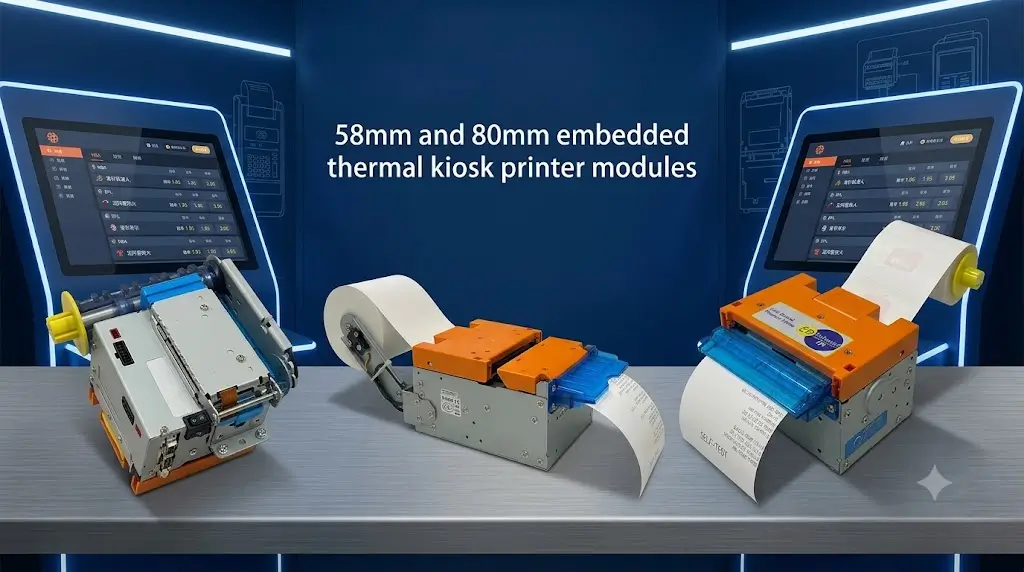
58mm vs 80mm Kiosk Printer for Sports Betting
Paper width should be selected from the real slip template.
A short confirmation slip may only need a transaction ID and timestamp. A full betting slip may include market details, odds, stake, payout reference, QR code, barcode, terminal ID, support content, and operator information.
For that reason, 80mm is usually the first width to evaluate for full betting slips.
| Selection Point | 58mm / 60mm Kiosk Printer | 80mm Kiosk Printer |
|---|---|---|
| Best fit | Short confirmation slips | Full betting slips and validation records |
| Slip layout | Limited room for references | More room for betting details and code placement |
| QR code or barcode room | Limited, must be tested carefully | More layout room for scannable codes |
| Betting content | Better for simple references | Better for market, stake, payout, and support content |
| Cabinet space | Easier for compact terminals | Requires more internal and front-panel space |
| Paper roll planning | Often smaller in compact designs | Better for busy venues if larger rolls are supported |
| Sports betting use | Simple confirmation output | Betting slip, payout reference, validation record |
| Project risk | Slip may become crowded if content grows | Needs more enclosure and service-access planning |
Project manager note: do not approve 58mm only because the cabinet is tight. Print a real betting slip with the longest market name, QR code, barcode, payout reference, terms, and footer content before confirming the width.
For a broader paper-width comparison, see our 58mm vs 80mm Kiosk Printer Guide.
Standard Cutter Printer vs Presenter Printer
The output method matters because user behavior can affect slip handling.
A standard cutter printer prints and cuts the slip directly at the output slot. This can work when the terminal is supervised and users collect slips normally.
A presenter printer holds the slip and presents it in a more controlled way. This can help in unattended betting kiosks, high-volume venues, or workflows where early pulling or uncollected slips may create service issues.
| Selection Point | Standard Cutter Printer | Presenter Kiosk Printer |
|---|---|---|
| Best fit | Supervised or standard slip output | Unattended or high-volume betting kiosk |
| User behavior | Works when users collect normally | Better when early pulling is a concern |
| Output control | Prints and cuts at the outlet | Holds and presents paper in a controlled way |
| Uncollected slips | Less output control | Better fit when controlled output is required |
| Mechanical design | Usually simpler | Requires more output-slot planning |
| Venue operation | Cost-sensitive or standard workflow | Higher-reliability slip handling |
For sports betting projects, presenter selection should be discussed before the cabinet drawing is frozen.
It affects output slot design, paper path, jam recovery, service access, and software timing. If slip collection behavior is uncertain, test both output methods during the prototype stage.
For a deeper comparison, see our Presenter Printer vs Auto Cutter Printer Guide.
Betting Slip vs Payment Receipt
Some terminals print betting slips. Others print payment receipts, payout references, void records, or several templates from the same printer.
| Output Type | Typical Content | Selection Focus |
|---|---|---|
| Betting slip | Bet details, QR code, barcode, transaction ID | Code readability and layout width |
| Payment receipt | Amount, payment method, timestamp | Clear transaction record |
| Payout reference | Claim number, validation code | Code clarity and output control |
| Void or refund slip | Transaction reference and reason | Record accuracy and readability |
| Operator record | Service or maintenance reference | Stable output and system logging |
Before selecting the printer, prepare real slip and receipt templates. This helps prevent layout problems during software integration and scanner validation.
Architecture and Workflow Layer
A typical sports betting kiosk printer workflow may look like this:
User interface → Betting software → Account or payment module → Embedded kiosk printer → Scanner or validator → Industrial controller → Sportsbook platform
Depending on the project, the kiosk may also include:
- Touchscreen
- Payment terminal
- Account or card module
- QR code or barcode scanner
- Embedded thermal printer
- Industrial mini PC or Android controller
- Network module
- Remote monitoring software
- Sportsbook platform integration
- Operator management system
- Security and access control modules
The printer should be checked as part of this full architecture.
For example, the printer may fit the cabinet in isolation, but conflict with the scanner bracket, payment cable path, controller position, security module, or service door. A slip may print correctly in the lab, but the barcode may fail when the real slip content is added.
Bet placement, slip printing, scanner validation, payout reference, and exception handling should be tested together under realistic venue conditions.
For system-level planning, see our Self-Service Kiosk System Hub.
What Experienced Integrators Usually Evaluate
Experienced sportsbook kiosk teams do not choose a printer only by print speed.
In review meetings, the questions are usually practical:
- What type of slip or receipt will the kiosk print?
- Does the printout include QR codes or barcodes?
- How long can the market name or transaction reference become?
- Is 58mm, 60mm, or 80mm paper suitable?
- Does the slip need to be cut or presented in a controlled way?
- Will users pull the slip before cutting is complete?
- What happens if a slip is not collected?
- Can staff replace paper during event peaks?
- Does the printer fit the cabinet and output slot?
- Does the printer support the selected operating system?
- Are Windows, Linux, or Android drivers available?
- Is SDK or command-level integration required?
- Can the software monitor paper-out, cutter, cover, or jam events?
- Can the same printer choice support pilot testing and rollout?
These questions matter because betting kiosks often operate during concentrated event periods. A printer that works in a short demo may still create field issues if output handling, service access, or slip validation is not tested.
For integration planning, see our Kiosk Printer SDK and Status Feedback Guide.
Deployment Reality
Sports betting kiosk printer projects often look simple in the first prototype.
A sample slip prints correctly. The QR code appears. The software sends commands. The cabinet looks ready.
Field operation is different.
Users may print slips quickly before or during live events. Some users pull slips early. Some leave slips behind. Staff may need to replace paper during busy periods. Printed slips may need to stay readable for scanning, validation, payout, support, or reconciliation.
For rollout projects, test the printer as part of the complete betting workflow. Do not test it only as a standalone printer.
Important deployment checks include:
- Test slips with real transaction data.
- Check QR code and barcode readability.
- Confirm paper replacement time.
- Review output slot alignment.
- Verify cutter or presenter behavior.
- Plan for uncollected slips if needed.
- Confirm driver and SDK resources early.
- Review mechanical files before cabinet tooling.
- Run pilot tests during realistic peak betting periods.
For technical files, drivers, SDKs, and integration documents, visit the SNRO Download Center.
For sports betting projects, printer selection can support the approved terminal workflow. Final compliance depends on the complete kiosk, betting software, operator process, documentation, testing, and local market requirements.
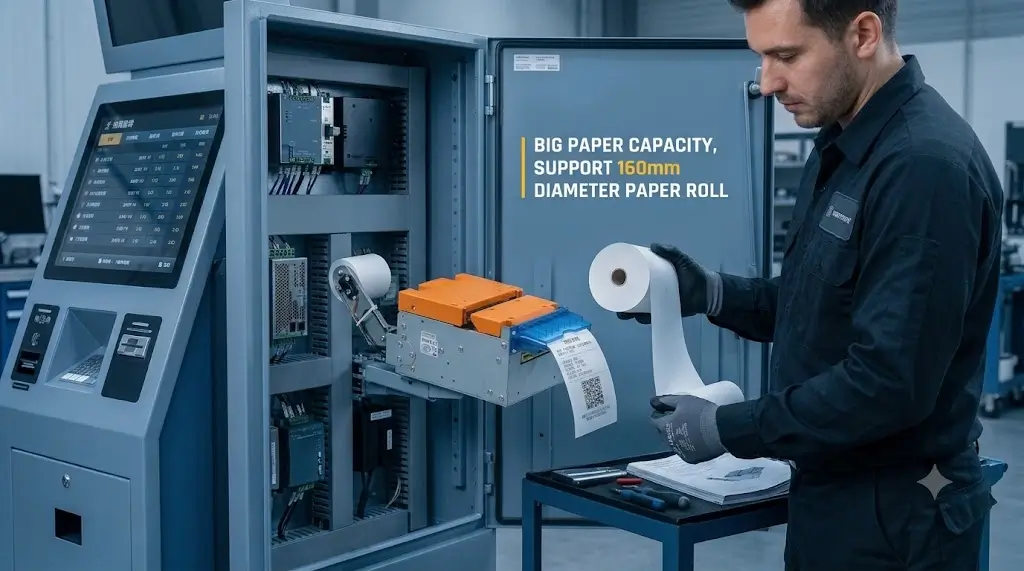
Application Scenarios
Sportsbook Self-Service Kiosks
Sportsbook kiosks may print betting slips, transaction references, QR codes, barcodes, and payout records.
During event peaks, the printer should support stable output, readable codes, and fast paper replacement.
Betting Terminals in Retail Venues
Retail betting terminals may be installed in supervised environments.
Even when staff are nearby, paper replacement and service access should be simple because one staff member may support several terminals.
Casino and Gaming Venue Kiosks
Gaming venues may require stable slip output, readable validation codes, and predictable service procedures.
Printer status monitoring may help reduce support work when several terminals are deployed in the same venue.
Lottery and Sports Betting Hybrid Terminals
Hybrid terminals may print lottery tickets, betting slips, payment receipts, and validation references.
The printer should support multiple print templates and readable codes. The layout should be tested with all expected ticket and receipt formats.
For related gaming and lottery printing applications, see our Gaming and Lottery Printer Solution.
Event-Based Betting Kiosks
Event-based deployments may see heavy usage in short periods.
Paper capacity, output reliability, paper loading access, and maintenance response should be tested under realistic load.
How to Choose
1. Confirm the Slip Format First
Start with the real betting slip template. Do not choose the printer only from a hardware list.
Confirm whether the slip includes:
- Bet reference number
- Transaction ID
- QR code
- Barcode
- Timestamp
- Market or event information
- Stake and payout reference
- Account or session reference
- Terms or support information
- Operator or terminal information
If the slip is information-dense, 80mm paper is usually easier to work with.
2. Choose the Paper Width
Use 58mm or 60mm when the kiosk prints short confirmations or simple references.
Use 80mm when the kiosk prints detailed betting slips, QR codes, barcodes, payout references, terms, or longer text.
For many sports betting kiosks, 80mm gives more layout flexibility and better readability.
3. Decide Between Standard Cutter and Presenter
If the kiosk is supervised and users collect slips normally, a standard cutter printer may be enough.
If the kiosk is unattended, high-volume, or affected by early pulling or uncollected slips, evaluate a presenter printer before locking the output slot design.
Make this decision before the output slot, service door, and paper path are finalized.
4. Review Cabinet Space and Service Access
The printer must fit inside the kiosk with enough room for:
- Paper roll
- Output path
- Cutter or presenter structure
- Cable routing
- Mounting structure
- Service access
- Jam clearing
- Front or side paper replacement
If staff cannot replace paper quickly, the kiosk may become unavailable during peak event periods.
For broader serviceability planning, see our Maintenance Accessibility Guide for Self-Service Kiosk Hardware.
5. Confirm Operating System and Interface
Sports betting kiosks may use Windows, Linux, Android, or embedded controller platforms.
Before selecting the printer, confirm:
- USB, serial, Ethernet, or other interface requirement
- Driver availability
- SDK availability
- Command support
- Printer status feedback
- Compatibility with betting software
- Back-end sportsbook platform workflow requirements
This step reduces integration risk during prototype testing.
For Linux-based projects, see our Linux Kiosk Printer Integration Guide.
6. Test QR Code and Barcode Readability
Sample text is not enough.
Test the printer with real QR codes, barcodes, transaction IDs, payout references, terms, and slip layouts.
Also test the actual scanner, validator, or back-office workflow that will read the slip. Printer output and validation performance should be checked together.
For scanner-side hardware selection, see our Fixed Mount Barcode Scanner Solutions.
7. Plan for Pilot and Rollout
The printer used in prototype testing should be realistic for future deployment.
Changing the printer later may affect the enclosure, wiring, slip layout, software, scanner validation, and service workflow.
For multi-location rollouts, use pilot testing to confirm paper consumption, maintenance frequency, user collection behavior, printer status monitoring, and peak-event reliability.
Final Selection Checklist
Before approving a sports betting kiosk printer, review the following checklist with the mechanical, electrical, software, and sportsbook platform teams.
| Check Item | Why It Matters |
|---|---|
| Real betting slip sample | Confirms whether 58mm / 60mm is enough or 80mm is required |
| Longest market or event name | Tests line wrapping and slip readability |
| QR code or barcode content | Needs enough width, quiet zone, and print clarity |
| Payout or validation reference | Confirms whether the slip can support later scanning or payout |
| Kiosk enclosure structure | Determines embedded printer, compact printer, or presenter direction |
| Output slot position | Must match user collection angle and paper path |
| Paper roll space | Affects refill frequency during event peaks |
| Paper loading method | Determines whether staff can reload paper quickly |
| Cutter or presenter behavior | Affects slip collection and early-pull risk |
| Interface | Must match the host controller and betting software |
| Driver or SDK availability | Reduces integration risk during prototype testing |
| Printer status feedback | Helps software handle paper-out, cutter, cover, or jam events |
| Scanner or validator test | Confirms printed codes can be read reliably |
| Pilot test result | Confirms performance before venue or multi-location rollout |
Recommended SNRO Printer Directions for Sports Betting Kiosks
Once the betting slip format, kiosk structure, output method, and service access are clear, the printer shortlist becomes much easier.
SNR-KP800-VX 80mm Kiosk Printer for Sports Betting Slip Output
Choose SNR-KP800-VX when the sports betting kiosk needs standard 80mm slip or receipt output for sportsbook kiosks, betting terminals, gaming receipt output, lottery and betting hybrid terminals, or general self-service transaction records.
SNR-KP802-VX Presenter Kiosk Printer for High-Volume Sports Betting Kiosks
Choose SNR-KP802-VX when controlled slip output is important, especially for high-volume sports betting kiosks, unattended betting terminals, venues where users may pull slips early, or projects requiring controlled ticket or receipt presentation.
SNR-KP805 Kiosk Thermal Printer for Betting Slip and Receipt Output
Choose SNR-KP805 when the project needs a cost-sensitive 80mm printer direction for betting receipt terminals, payment confirmation kiosks, retail sportsbook terminals, and multi-location rollout projects.
SNR-KP602 Series Compact Kiosk Printer for Short Betting Confirmations
Choose SNR-KP602 Series when the betting terminal is compact and the printout is short, such as simple confirmation slips, small-format transaction references, or space-limited kiosk designs.
What Successful Deployments Usually Have in Common
Successful sports betting kiosk printer deployments usually share the same pattern.
The slip format is confirmed early. The printer is tested with real betting data. QR codes and barcodes are verified with real scanners. The mechanical team checks the cabinet and output slot. The software team confirms driver, SDK, and status feedback. The operation team checks paper replacement during peak periods.
These details may look small during planning. In the field, they often decide whether the betting kiosk stays available during high-demand periods.
Conclusion
Choosing a kiosk printer for a sports betting kiosk is not only about print speed or price. The printer must match the slip format, kiosk enclosure, user behavior, betting software, validation workflow, maintenance access, and rollout plan.
For many sports betting kiosks, an 80mm embedded thermal printer is the first option to evaluate. For compact confirmation-only terminals, a 58mm or 60mm printer may work if the slip content is short. For unattended or high-volume deployments, a presenter printer may also be worth testing.
The safest approach is simple: test the printer with real betting slip layouts, real scanner validation, the real cabinet structure, and realistic event traffic before mass production.
Related Resources
Main Guides
- Kiosk Printer Product Hub
- Gaming and Lottery Printer Solution
- Self-Service Kiosk System Hub
- Ticket Kiosk Printer Selection Guide
- 58mm vs 80mm Kiosk Printer Guide
- How to Choose a Kiosk Printer for Self-Payment Kiosks
Related Printer Models
- SNR-KP800 Series Product Page
- SNR-KP802-VX Product Page
- SNR-KP805 Product Page
- SNR-KP602 Series Product Page
Technical Resources
- Drivers, SDKs and technical downloads for kiosk printer integration
- 80mm Kiosk Printer Resources
- Presenter Kiosk Printer Resources
- Kiosk Printer SDK and Integration Guide
- Linux Kiosk Printer Integration Guide
FAQ
What printer is best for sports betting kiosks?
For many sports betting kiosks, an 80mm embedded thermal kiosk printer is the first option to evaluate. It provides enough width for betting details, transaction IDs, QR codes, barcodes, payout references, and support information.
Is a 58mm printer enough for betting slips?
A 58mm or 60mm printer may be enough for short confirmation slips. For detailed betting slips, QR codes, barcodes, payout references, terms, or support information, 80mm is usually more readable and flexible.
Should a sports betting kiosk use a presenter printer?
A presenter printer may be useful when the kiosk is unattended, high-volume, or affected by users pulling slips early. It may also help when uncollected slips need better output handling.
What should be tested before choosing a sports betting kiosk printer?
Test real slip layouts, QR code readability, barcode readability, scanner validation, cutter or presenter behavior, paper replacement, output slot alignment, driver support, SDK integration, and peak-event operation.
What operating systems should a sports betting kiosk printer support?
Sports betting kiosks may use Windows, Linux, Android, or embedded platforms. Driver, SDK, and command support should be confirmed before selecting the printer.
Does printer selection determine sports betting compliance?
No. Printer selection can support the approved slip output workflow, but final compliance depends on the complete kiosk, betting software, operator process, documentation, testing, and local market requirements.
How should operators plan paper replacement for sports betting kiosks?
Plan paper replacement around peak event traffic, paper roll capacity, service door access, and staff workflow. In busy venues, staff should be able to replace paper quickly without moving the kiosk or disturbing nearby modules.
Which SNRO printer models can be considered for sports betting kiosk projects?
For standard 80mm slip output, consider SNR-KP800 Series. For controlled slip presentation, evaluate SNR-KP802-VX. For cost-sensitive 80mm output, consider SNR-KP805. For compact short-slip workflows, evaluate SNR-KP602 Series.
Can SNRO recommend a printer for a sports betting kiosk project?
Yes. SNRO can review the slip format, barcode requirement, kiosk structure, interface requirement, operating system, paper loading direction, output method, transaction volume, and expected deployment environment to recommend a practical printer for testing.
Need Help Choosing a Printer for Your Sports Betting Kiosk?
If you are designing a sportsbook kiosk, betting terminal, gaming venue kiosk, lottery and betting hybrid terminal, or event-based betting system, SNRO can help review your printer direction before prototype testing.
Share your betting slip sample, barcode or QR code requirement, cabinet layout, output method, operating system, interface, paper loading direction, and expected peak transaction volume. Our team will recommend a suitable 80mm, compact, or presenter kiosk printer for your sports betting deployment.


