


Blog
Healthcare Self-Service Kiosk Hardware Solutions for System Integrators

If you have ever arrived at a hospital for a morning appointment, you know the scene. Long queues at the front desk. Staff juggling phone calls while trying to check in patients. Patients filling out the same paperwork they filled out last time. It is not an ideal experience for anyone.
Now consider the hospital’s perspective. Every minute a staff member spends manually printing wristbands, handing out patient ID cards, and explaining which waiting room to go to is a minute they are not doing something more valuable. In an environment where staffing shortages are the norm and administrative burden continues to grow, hospitals are looking for ways to move patients through the check-in process faster—without compromising accuracy or patient experience.
That is where self-service kiosks come in. But here is what experienced healthcare IT directors will tell you: the software workflow matters, sure. What matters more is hardware that actually works, every time, shift after shift.
Because patients do not remember the check-in that went smoothly. They remember the printer that jammed, the wristband that did not print, or the kiosk that needed a staff member to come over and fix it during the morning rush. And when that happens, the kiosk is not saving anyone time. It is costing time.
Successful healthcare automation depends on hardware that can handle thousands of patient interactions without failing. SNRO provides hardware solutions for patient check-in kiosks, registration terminals, and payment stations—kiosk printers, patient wristband printers, RFID card dispensers, barcode scanners, payment devices, and industrial PCs designed specifically for medical environments.
Key deployment data: Registration time reduction of 60-70%, front desk workload decrease of 30-40%, patient satisfaction improvement of 25-35%, and data entry accuracy of 98% vs. 85% manual.
Quick Answers
Q: What hardware does a healthcare self-service kiosk require?
A patient check-in kiosk typically includes: touchscreen, ID/insurance card scanner, thermal receipt printer, optional wristband printer, RFID card dispenser (for patient ID card issuance), payment module, industrial mini PC, and HIS/EMR system integration.
Q: How to integrate a kiosk printer with hospital HIS/EMR systems?
SNRO provides SDK, API documentation, and sample code for print job management. Most HIS/EMR systems communicate with kiosk printers via standard serial, USB, or Ethernet interfaces using ESC/POS commands. Integration support includes HL7 compatibility for patient data synchronization.
Q: What is the main challenge for system integrators in healthcare deployments?
Not selecting individual devices—but making the complete workflow reliable: patient identification, insurance verification, demographic confirmation, card issuance, receipt printing, wristband printing, and staff notification—all within a compact, unattended enclosure.
Q: Why do healthcare kiosks use dedicated kiosk printers instead of POS printers?
Unlike attended POS printers, healthcare kiosk printers are designed for 24/7 unattended operation. Features such as presenter/retract functionality, jam detection feedback, paper low sensors, and ticket-taken sensing ensure reliability in environments where staff are unavailable to assist or monitor.
What Hardware Does a Healthcare Self-Service Kiosk Require?
A practical patient check-in kiosk connects guest-facing devices, printing modules, card issuance hardware, payment devices, and backend hospital systems through an industrial controller.
| Hardware Module | Typical Function | Integration Concern |
|---|---|---|
| Touchscreen | Patient check-in interaction, demographic confirmation | UI workflow, ADA compliance, durability, cleanability |
| ID / Insurance card scanner | Patient identification, insurance verification | OCR accuracy, document type support, interface compatibility |
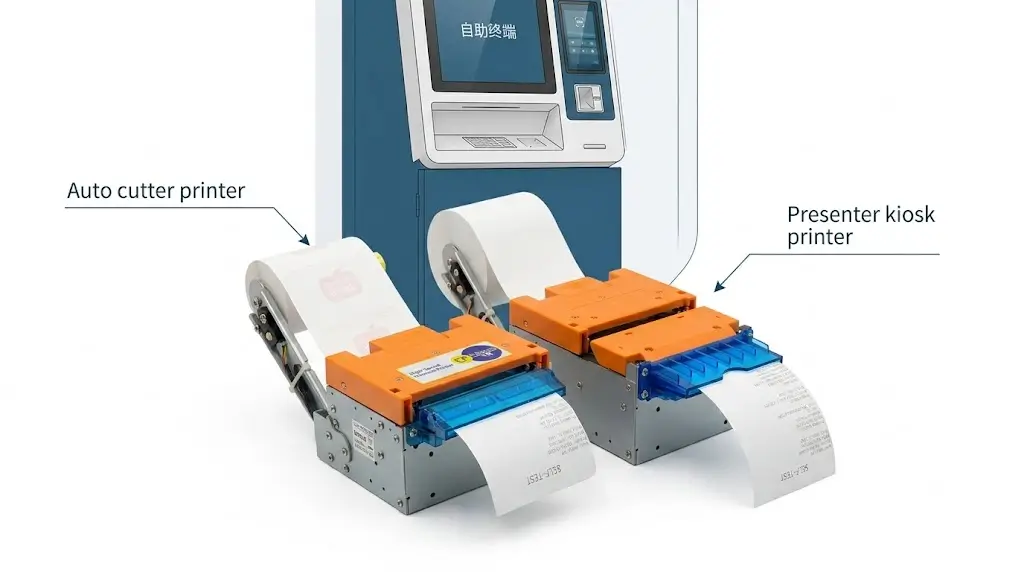
| Thermal receipt printer | Appointment receipts, location directions, patient instructions | Paper width, presenter function, paper capacity, jam detection |
| Patient wristband printer | Patient ID wristbands, allergy alerts, barcode labels | Medical-grade media, barcode scannability, print speed |
| RFID card dispenser | Patient ID card issuance (first visit), RFID encoding | Card capacity, card type, encoding compatibility |
| Payment module | Copay collection, balance payment | PCI compliance, EMV certification, receipt printing integration |
| Industrial mini PC | Main control and device communication | COM ports, USB expansion, Linux/Windows support, fanless operation |
| HIS/EMR connection | Demographic sync, appointment verification | API reliability, HL7 compatibility, data security, network handling |
Key Hardware Components for Healthcare Kiosks
Thermal Kiosk Printer for Patient Receipts
In healthcare environments, receipt printing reliability directly impacts patient experience. A printer that jams or runs out of paper during morning peak hours forces patients to wait—or staff to intervene.
Critical features for healthcare deployments:
| Feature | Why It Matters in Healthcare |
|---|---|
| Presenter function | Holds receipt until patient takes it—prevents uncollected papers and maintains professional appearance |
| Ticket retract capability | Recovers uncollected receipts to prevent litter and paper waste |
| Anti-jam structure | Reduces service calls in unattended environments |
| Auto cutter | Clean, professional receipt presentation |
| Paper low sensor | Alerts facilities staff before paper runs out |
| Quiet operation (<55dB) | Does not disturb waiting areas |
Applications: Appointment receipts, payment confirmations, location/direction printouts, patient instructions, queue tickets. Printers with presenter and retract functionality are recommended for unattended lobby kiosks where patients may not collect every receipt.
Patient Wristband Printer
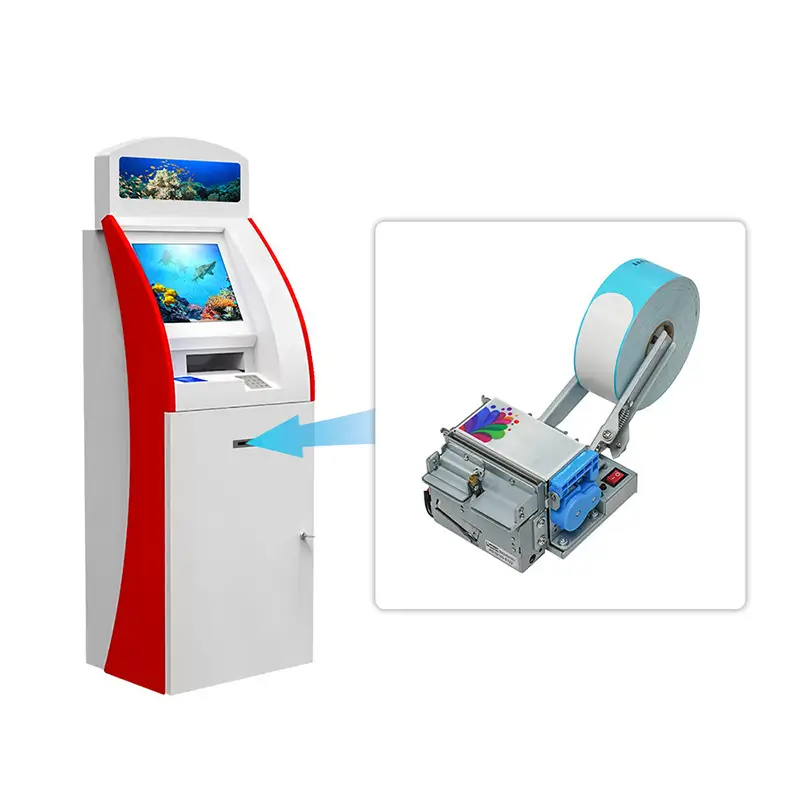
Many patient check-in kiosks now print wristbands directly at the terminal—no staff intervention required.
Why this matters: It reduces manual wristband writing errors, ensures consistent barcode quality for patient ID scanning, frees nursing staff for clinical duties, and eliminates the bottleneck of staff printing wristbands for every arriving patient.
Medical-grade requirements:
– Direct thermal technology—no ribbons or consumables
– Medical-grade, latex-free wristband media
– Barcode readability at 203 DPI for medical device scanning
– Supports standard wristband sizes with secure adhesive for extended wear
Applications: Patient identification wristbands with barcode/QR code, allergy alerts, medication warnings, admission date/time stamps.
RFID Patient ID Card Dispenser
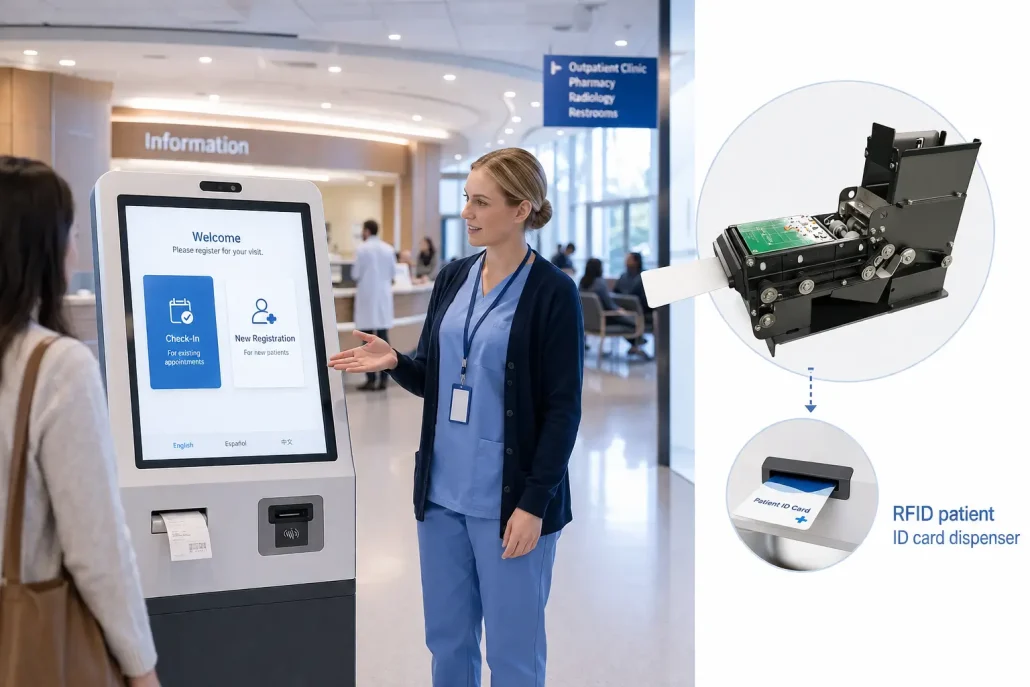
Hospitals and clinics increasingly use patient ID cards for identification, registration, and tap-to-check-in workflows.
Typical requirements:
– RFID card issuance (ISO14444A, Mifare compatible)
– Hopper capacity: 100-150 cards
– Adjustable card thickness (0.3mm – 2.0mm)
– Card detection and SDK support
– Retract function for unclaimed cards—prevents dispenser jams
Applications: Patient ID cards, membership cards, visitor/access credentials, insurance cards.
Fanless Industrial Mini PC
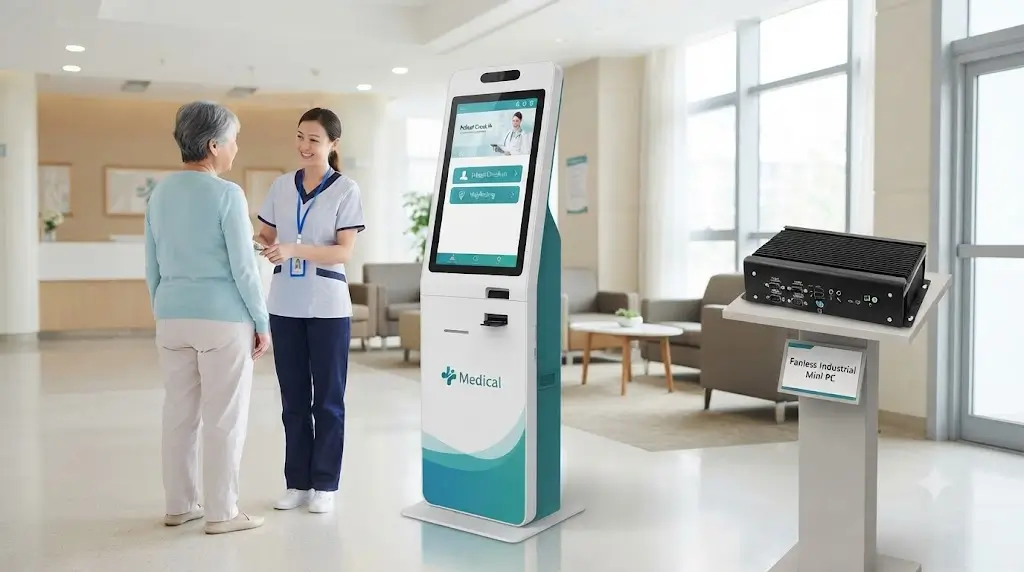
The industrial PC is the least visible component—and often the most critical. While teams initially compare CPU specifications, interface compatibility and long-term operation become higher priorities during integration.
Why healthcare deployments need industrial PCs:
– Fanless operation—no dust or pathogen circulation, important for cleanroom and clinical environments
– Multiple COM ports for peripheral communication (printer, scanner, dispenser, payment module)
– USB expansion
– 24/7 continuous operation
– Linux/Windows compatibility
Typical connected peripherals:
– Kiosk printers
– ID/insurance scanners
– Card dispensers
– Payment devices
– Barcode scanners
– HIS/EMR systems
Healthcare Kiosk Workflow
Patient arrives at hospital -> Approaches self-service check-in kiosk -> Scans insurance card or enters patient ID -> Confirms demographic information on screen ->Kiosk prints patient ID card (if first visit) -> Kiosk prints appointment receipt with room/location -> Kiosk prints patient ID wristband (optional) -> Patient proceeds to waiting area -> Staff notified of completed check-in via HIS/EMR network
Total time: Under 2 minutes (vs. 5-10 minutes at front desk).
Recommended Hardware for Healthcare Self-Service Kiosks
Need help selecting the right printer for your healthcare kiosk?
Already have a kiosk layout and integration timeline?
Integration Considerations for Healthcare Environments
HIS/EMR System Integration
Healthcare kiosks must integrate with hospital information systems (HIS) and electronic medical records (EMR) platforms. API reliability, data security, and network interruption handling are critical evaluation points.
Integration requirements:
– SDK and API documentation for print job management
– HL7 compatibility for patient data synchronization
– Secure data transmission for HIPAA compliance
– Network interruption handling—queued print jobs, offline mode support
Regulatory Compliance
Healthcare deployments require adherence to specific standards:
| Standard | Relevance |
|---|---|
| ADA | Accessibility requirements for patient kiosks |
| HIPAA | Data security and patient privacy |
| EMV Level 1 | Payment terminal certification |
| CE/FCC/RoHS | Hardware safety and environmental compliance |
| Antimicrobial materials | Infection control for touch surfaces |
Fanless thermal design is increasingly specified for healthcare environments because it eliminates pathogen-circulating dust from cooling fans.
Antimicrobial and Cleanability
Healthcare kiosk hardware must withstand frequent cleaning with hospital-grade disinfectants. Hardware specifications should include:
– Antimicrobial coating options for touchscreens and enclosures
– Smooth surfaces without crevices that trap contaminants
– IP-rated enclosures for splash and dust protection
Healthcare Kiosk Hardware Selection Matrix
| Deployment Type | Typical Hardware Configuration | Key Evaluation Point |
|---|---|---|
| Hospital lobby check-in | Touchscreen + receipt printer + card dispenser + wristband printer + industrial PC | Peak-hour patient flow, multi-workflow reliability |
| Clinic registration kiosk | Touchscreen + receipt printer + ID scanner + industrial PC | Compact installation, simple workflow |
| Self-service payment terminal | Touchscreen + receipt printer + payment module + industrial PC | PCI compliance, receipt speed |
| Emergency department registration | Touchscreen + wristband printer + receipt printer + industrial PC | Speed, wristband reliability, high-volume throughput |
| After-hours self-check-in | Touchscreen + receipt printer + card dispenser + industrial PC | Unattended operation reliability, remote monitoring |
Common Hardware Challenges in Healthcare Kiosk Deployments
Healthcare kiosks are designed to reduce front desk workload and improve patient experience. However, long-term reliability depends on much more than software integration.
Receipt Printing Reliability
Receipt printers in hospital kiosks often operate continuously during morning rush, making paper handling, jam prevention, and presenter design critical.
Long-term uptime depends on:
– Paper loading convenience (front drop-in preferred)
– Jam prevention and anti-jam mechanism
– Presenter design for controlled receipt delivery
– Service accessibility and paper low alerts
Card Issuance Reliability
A kiosk may complete the entire registration process successfully, but a failed patient ID card delivery still requires staff intervention.
Common contributing factors:
– RFID card variations and thickness tolerance
– Card storage conditions (humidity, temperature)
– Double-card feeding
– Hopper performance and regular maintenance
Wristband Printing Quality
Medical wristbands require consistent barcode quality for scanning by clinical devices. Print speed must be balanced with adhesion and media handling.
Key considerations:
– Barcode scannability (203 DPI minimum)
– Media compatibility—latex-free, medical-grade wristbands
– Print speed vs. wristband complexity
Maintenance Accessibility
One of the most overlooked aspects of kiosk design is maintenance accessibility. Components that are difficult to inspect, clean, or replace increase service time and operational costs.
Accessibility directly affects:
– Downtime
– Service efficiency
– Operational continuity
– Long-term ownership cost
Why Hardware Selection Matters
Two patient check-in kiosks may deliver identical guest-facing functionality while producing very different long-term operating experiences. For hospital IT directors and system integrators, the question is not whether the kiosk checks in patients today—but whether it will continue to do so after six months of continuous operation.
SNRO vs. Competitors: Hardware Selection Comparison
| Evaluation Criteria | SNRO Healthcare Kiosk Hardware | Typical Competitor Offerings |
|---|---|---|
| Printer presenter/retract | Available standard on SNR-KP802-VX | Typically optional or unavailable |
| SDK & Linux drivers | Full SDK, Linux drivers, ESC/POS command set | Limited Linux support on entry models |
| Customization (OEM/ODM) | Color, logo, cutout dimensions, firmware | Limited to high-volume minimums |
| Medical-grade wristband support | Dedicated medical wristband printer model | Not typically offered |
| Fanless industrial PC | Standard, multiple COM ports for integration | Often consumer-grade or limited I/O |
| Antimicrobial options | Available upon request for touch surfaces | Not typically available |
| Integration support | Direct engineering support, sample code provided | Standard documentation only |
Hardware affects:
– Receipt printing reliability during peak hours
– Wristband quality and barcode scannability
– Card issuance success rate
– Maintenance frequency and serviceability
– System uptime and operational continuity
– Total cost of ownership
Before You Select Hardware for Your Healthcare Kiosk
Before choosing hardware, ask:
✓ Will your kiosk operate in a high-traffic hospital lobby or a quiet clinic setting?
✓ Does your deployment require patient wristband printing?
✓ How many peripherals need to communicate simultaneously?
✓ Is installation space limited?
✓ Will your system operate 24/7?
✓ What HIS/EMR system are you integrating with?
Identifying these requirements early helps avoid deployment issues.
Not sure which hardware configuration fits your healthcare environment? → [Read the Full Buying Guide]
Typical Healthcare Projects We Support
– Hospital Lobby Self Check-In Kiosks
– Clinic Patient Registration Terminals
– Emergency Department Check-In Stations
– After-Hours Patient Registration Kiosks
– Self-Service Payment and Copay Terminals
– Outpatient Clinic Registration Stations
– Diagnostic Center Check-In Terminals
– Multi-Specialty Clinic Deployments
– Hospital Network Scale-Out Programs
Frequently Asked Questions
| Question | Answer |
|---|---|
| What hardware does a patient check-in kiosk require? | Touchscreen, ID/insurance scanner, thermal printer, optional wristband printer, optional card dispenser, industrial PC, and HIS/EMR integration. Configuration depends on workflow and patient volume. |
| How to integrate a kiosk printer with hospital HIS/EMR systems? | SNRO provides SDK, API documentation, and sample code. Integration uses serial (RS-232), USB, or Ethernet interfaces with ESC/POS commands. |
| Can your printers integrate with hospital EMR systems? | Yes. SNRO provides SDK and API documentation. Most EMR systems send print jobs to kiosk printers via standard interfaces. |
| How to choose between a presenter printer and an auto-cutter printer for a hospital kiosk? | Presenter printers are recommended for unattended hospital lobbies where patients may leave receipts uncollected—they control delivery and offer retract functionality. Auto-cutter printers suit supervised check-in counters or attended stations. |
| How to install a panel printer in a compact hospital kiosk cabinet? | Front-mount design with #6/32 screw fixation. Panel cutout dimensions and paper outlet alignment must be confirmed during mechanical design phase. SNRO provides installation drawings and cutout templates. |
| Can your hardware handle high-volume hospital deployments? | Yes. Industrial-grade components, long-life cutter mechanisms (≥1,000,000 cuts), and large paper roll capacities support high-volume workflows. |
| Do healthcare kiosks require Linux-compatible hardware? | Many healthcare automation platforms operate on Linux-based systems. SNRO provides Linux driver support and SDKs for integration. |
| What about HIPAA compliance and data security? | SNRO hardware facilitates secure, compliant workflows through encrypted data transmission, secure SDK integration, and support for HIPAA-compliant HIS/EMR system connectivity. |
| Why use dedicated kiosk printers instead of POS printers in healthcare? | Dedicated kiosk printers are purpose-built for unattended environments with anti-jam mechanisms, presenter/retract functionality, larger paper roll capacities, and jam detection feedback—critical features in healthcare deployments. |
| Can your printers print patient wristbands? | Yes. SNRO offers medical-grade wristband printers (SNR-WP-01) that use latex-free, medical-grade media with 203 DPI barcode quality. |
| How reliable are RFID card dispensers in hospital check-in kiosks? | Modern RFID card dispensers provide highly reliable operation when matched with compatible card specifications and supported by proper maintenance practices. |
| What are the most common hardware issues in healthcare kiosk deployments? | Receipt printing reliability, wristband quality consistency, card issuance reliability, maintenance accessibility, and multi-device communication are among the most common operational considerations. |
| How often should healthcare kiosk hardware be maintained? | Maintenance schedules vary by patient volume and operating environment. High-traffic hospitals benefit from periodic inspections of printers, card dispensers, and other critical hardware modules. |
Need a quick hardware checklist for your hospital kiosk project?
Related Resources
Related Hardware
- 80mm Kiosk Printer
- Panel Mount Printer
- Card Dispenser
- Fanless Industrial Mini PC
- Medical Wristband Printer
Recommended Buying Guides
- Presenter Printer vs Auto-Cutter Printer for Unattended Kiosks
- Kiosk Printer Buying Guide for Self-Service Systems
- Card Dispenser Integration Guide for Healthcare
Technical Resources
- Kiosk Printer SDK and Integration Guide
- Card Dispenser Preventive Maintenance Guide
- Linux Kiosk Printer Integration Guide
Related Solutions
- Queue Management Hardware Solutions for Hospitals
- Access Control Kiosk Hardware for Medical Facilities
- Visitor Management Hardware for Healthcare Campuses
Need Help Evaluating Hardware for Your Healthcare Kiosk?
If you are planning a hospital check-in kiosk, clinic registration terminal, emergency department check-in station, or outpatient registration system, SNRO can help review your hardware configuration before sample testing.
Share your deployment environment, patient volume, HIS/EMR integration requirement, receipt and wristband printing needs, and operating system platform. Our engineering team will recommend suitable printer, card dispenser, scanner, and industrial controller hardware for your healthcare kiosk deployment.


